Patterns and mirrors
Patterns repeat features, faces or whole bodies. Each makes one feature in the tree; change the original and every copy follows.
| To repeat | Use |
|---|---|
| In a row or grid | Linear Pattern |
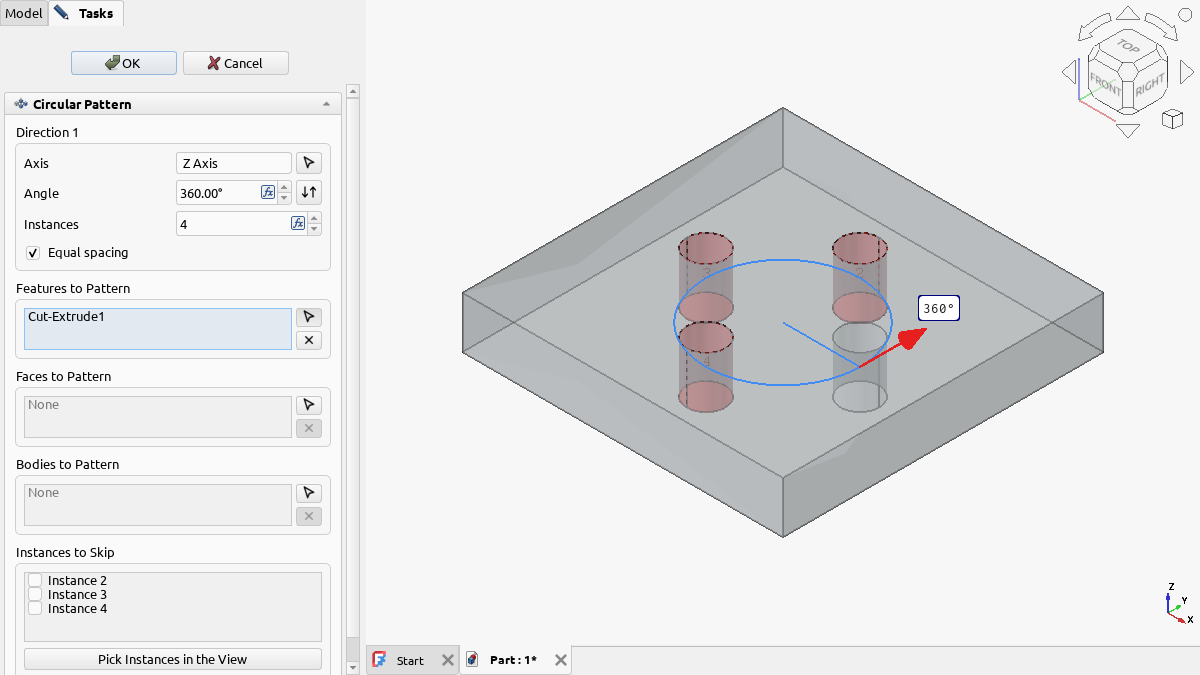
| Round an axis | Circular Pattern |
| Along a curve | Curve Driven Pattern |
| At a sketch's points | Sketch Driven Pattern |
| At typed positions | Table Driven Pattern |
| Over a whole face | Fill Pattern |
| With its sizes changing | Variable Pattern |
| On the other side of a plane | Mirror |
Features, faces or bodies
Every pattern has three boxes: Features to Pattern (features from the tree), Faces to Pattern (faces, for a model with no history, such as an import) and Bodies to Pattern (whole bodies, which makes new bodies).
Leaving gaps
Instances to Skip lists the copies. Tick the ones to leave out, or click Pick Instances in the View and click them in the 3D view.