Radiate Surface
 A surface spreading outward from edges, parallel to a plane (a parting surface).
Radiate Surface spreads a surface outward from edges, parallel to a plane: a parting surface for a mould.
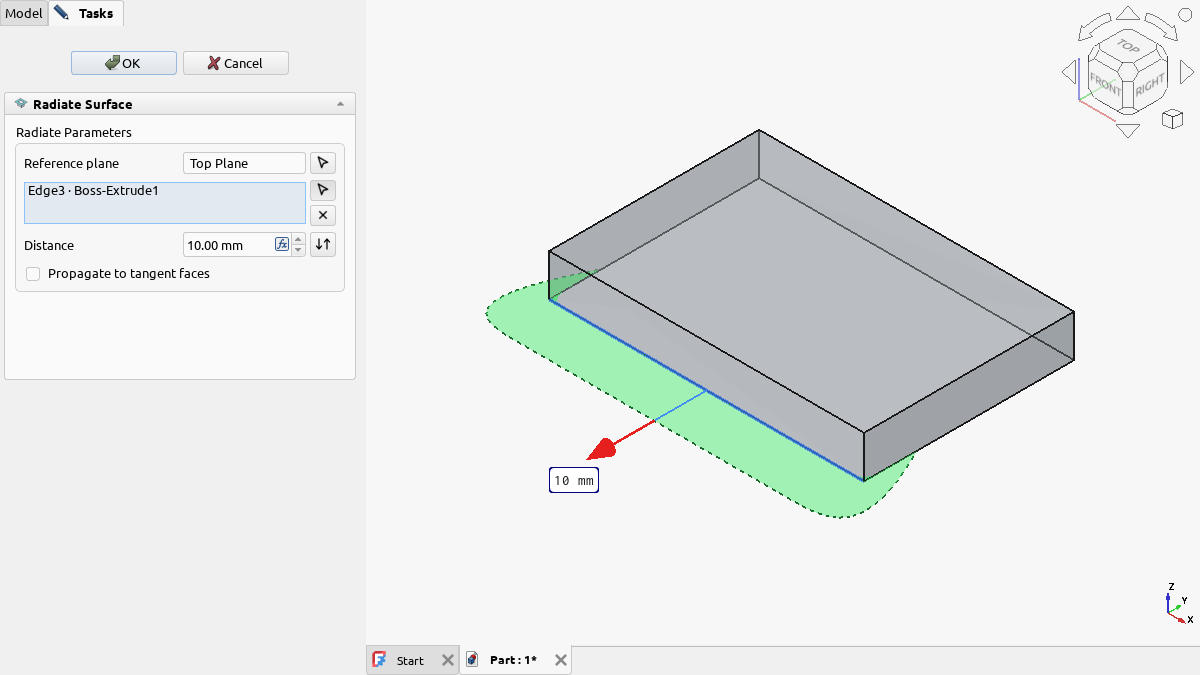
How to use it
- Select the edges and click Radiate Surface.
- Click the Reference plane the surface lies parallel to.
- Set the Distance (or drag the arrow), then click OK.
Where to find it
- The Surfaces toolbar, in the More Surfaces drop-down.
- Solid Design → Surfaces → Radiate Surface
- Insert → Surface → Radiate Surface
- Command search: press / in the 3D view and type its name.
- The command line: : then
radiatesurface(below).
The panel
Every control's tooltip says the same as here: hover over it in FreeCAD. OK (or Enter) makes the feature, Cancel (or Esc) leaves the model as it was.
Radiate Parameters
| Control | Kind | What it does |
|---|---|---|
| Reference plane | Selection box: click a plane or flat face | The surface lies parallel to this plane |
| Edges | Selection list: click edges | The edges to radiate from |
| Distance | A length | How far it reaches (a flip button beside it) |
| Propagate to tangent faces | A check box | Carry on along the edges meeting the picked ones smoothly |
Drag handles
While the panel is open, drag the handles in the 3D view to set Distance, or click a handle's value and type. The same handles show when you select the feature in the tree, so you can change it without opening the panel. See drag handles.
On the command line
Press : in the 3D view and type radiatesurface, then what to set. See the command line for how it works.
Values typed straight after the name set, in order: Distance. For example :radiatesurface 10.
Options it takes
| Option | How to type it | What it is |
|---|---|---|
Distance |
distance=a value |
How far it reaches |
Reverse |
reverse turns it on, reverse=no off |
Towards the faces instead |
PropagateTangent |
propagatetangent turns it on, propagatetangent=no off |
Carry on along the edges meeting the picked ones smoothly |
Properties
All properties
What the feature stores, as the Property editor shows it (select the feature in the tree, then the Data tab). The panel sets these for you.
| Property | Kind | Default | What it is |
|---|---|---|---|
ReferencePlane |
Picks | – | The plane the surface lies parallel to |
Items |
Picks | – | Edges to radiate from |
Distance |
Length | 10 mm | How far it reaches |
Reverse |
Yes/No | No | Towards the faces instead |
PropagateTangent |
Yes/No | No | Carry on along the edges meeting the picked ones smoothly |