Sweep
 Sweeps a profile along a path to add material, or to cut it (Add | Cut in the panel).
Sweep moves a profile along a path: pipes, handles, springs, cable runs. Add grows material, Cut removes it, Surface makes a surface body.
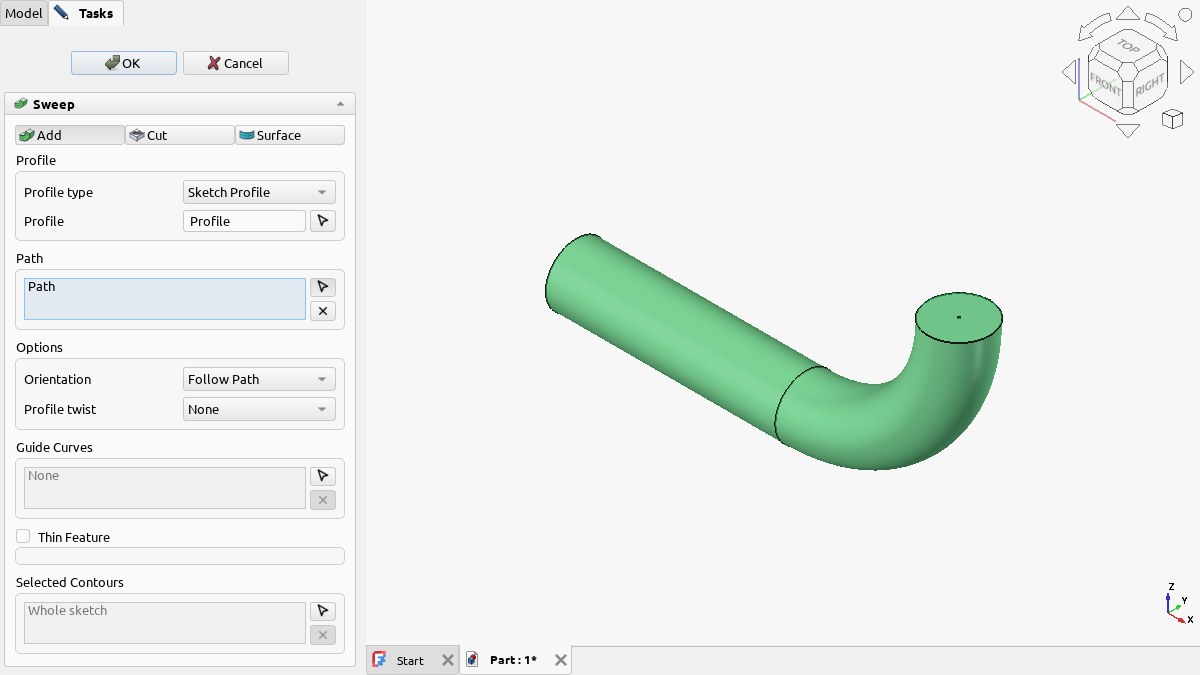
How to use it
- Draw the profile (usually a closed sketch) and the path (a sketch, an edge, or a curve). The profile should sit at the path's start, across it.
- Select the profile sketch and click Sweep.
- Click the path in the 3D view to fill Path.
- Choose how the profile turns along the path (Orientation, Profile twist), then click OK.
Good to know
- Profile type can be a circle instead of a sketch: give its diameter and the path is all you need (SolidWorks' circular profile).
- Guide Curves pull the profile's shape along the way.
Where to find it
- The Features toolbar.
- Solid Design → Features → Sweep
- Insert → Features → Sweep
- Command search: press / in the 3D view and type its name.
- The command line: : then
sweep(below).
The panel
Every control's tooltip says the same as here: hover over it in FreeCAD. OK (or Enter) makes the feature, Cancel (or Esc) leaves the model as it was.
| Control | Kind | What it does |
|---|---|---|
| **Add \ | Cut \ | Surface** |
Profile
| Control | Kind | What it does |
|---|---|---|
| Profile type | One of: Sketch Profile, Circular Profile, Solid Profile | Sketch profile: sweep a sketch. Circular profile: sweep a circle of the diameter, as for wires and pipes. Solid profile: sweep a tool body of revolution, as a cutter moving along a groove. |
| Diameter | A length | Diameter of the circular profile (shown for some choices only) |
| Tool body | Selection box: click a body | The tool body: a body of revolution (a revolve or a cylinder). It isn't cut by the sweep. (shown for some choices only) |
| Profile | Selection box: click a sketch | The sketch swept along the path. Press the button, then click a sketch. |
Path
| Control | Kind | What it does |
|---|---|---|
| Path | Selection list: click a path sketch or edges | The path: a sketch, or connected edges of the model or a sketch, in order |
Options
| Control | Kind | What it does |
|---|---|---|
| Orientation | One of: Follow Path, Keep Normal Constant, Specify Direction Vector, Tangent to Adjacent Faces, Natural | Follow Path: the profile turns with the path. Keep Normal Constant: it keeps facing the same way. Specify Direction Vector: it keeps its top towards a direction. Tangent to Adjacent Faces: it keeps square to the faces beside a path of model edges. Natural: it turns with the path's curvature. |
| Direction | Selection box: click an edge, axis or plane | The direction the profile keeps its top towards (shown for some choices only) |
| Profile twist | One of: None, Specify Twist Value, Follow Path and 1st Guide Curve, Follow 1st and 2nd Guide Curves | None: no twist. Specify Twist Value: turn the profile evenly along the path. Follow Path and 1st Guide Curve: turn it to keep touching the guide curve. Follow 1st and 2nd Guide Curves: the line between the two guides turns it. |
| Twist control | One of: Degrees, Turns | Give the twist in degrees or in turns (shown for some choices only) |
| Twist | A number | How far the profile turns along the whole path (a flip button beside it; shown for some choices only) |
| Turns | A number | How many turns the profile makes along the path (a flip button beside it; shown for some choices only) |
| Merge result | A check box | Fuse the new material with the bodies it touches. Off: it becomes a body of its own. (shown for some choices only) |
| Flip side to cut | A check box | Remove the material outside the profile instead of inside it (shown for some choices only) |
Guide Curves
Curves the profile follows: it is scaled (and, with two or more, turned and moved) to keep touching them
| Control | Kind | What it does |
|---|---|---|
| Guide curves | Selection list: click guide curve sketches | Sketches whose curves the profile follows; each must touch the profile |
Start/End Tangency
Shown only for some choices above.
| Control | Kind | What it does |
|---|---|---|
| Start tangency | One of: None, Path Tangent | Path Tangent: the sweep leaves the start square to the path, even where guide curves flare it |
| End tangency | One of: None, Path Tangent | Path Tangent: the sweep arrives square to the path |
Thin Feature
Make a wall of constant thickness from the sketch's curves instead of filling it
Optional: tick its title to use it.
| Control | Kind | What it does |
|---|---|---|
| Type | One of: One-Direction, Mid-Plane, Two-Direction | Which side of the curves the wall grows on (a flip button beside it; shown for some choices only) |
| Thickness | A length | Wall thickness (shown for some choices only) |
| Thickness 2 | A length | Wall thickness on the second side (shown for some choices only) |
Selected Contours
| Control | Kind | What it does |
|---|---|---|
| Regions | Selection list: click inside regions of the sketch | Use only some regions of the sketch: click inside them in the 3D view. Empty: the whole sketch. |
Feature Scope
Which bodies the feature works on
Shown only for some choices above.
| Control | Kind | What it does |
|---|---|---|
| **All bodies \ | Selected bodies** | Buttons: All bodies \ |
| Auto-select | A check box | Use the bodies the feature touches; untick to choose them (shown for some choices only) |
| Bodies | Selection list: click bodies in the 3D view or tree | The bodies the feature works on (shown for some choices only) |
Bodies to Keep
The cut splits a body: choose which pieces to keep
Shown only for some choices above.
| Control | Kind | What it does |
|---|---|---|
| **All bodies \ | Selected bodies** | Buttons: All bodies \ |
| A list | Tick the pieces to keep. They are numbered in the 3D view. |
On the command line
Press : in the 3D view and type sweep, then what to set. See the command line for how it works.
Options it takes
| Option | How to type it | What it is |
|---|---|---|
Mode |
a word: add, cut, surface |
Add material, cut it, or make a surface body |
Thin |
thin turns it on, thin=no off |
Thin Feature on/off |
ThinType |
a word: onedirection, midplane, twodirection |
Thin type |
ThinThickness |
thinthickness=a value |
Thickness |
ThinThickness2 |
thinthickness2=a value |
Thickness 2 (Two-Direction) |
ThinReverse |
thinreverse turns it on, thinreverse=no off |
Reverse the thin direction |
MergeResult |
mergeresult turns it on, mergeresult=no off |
Merge result (Add mode) |
FeatureScope |
a word: allbodies, selectedbodies |
Feature scope |
AutoSelect |
autoselect turns it on, autoselect=no off |
Auto-select the bodies in scope |
BodiesToKeep |
a word: allbodies, selectedbodies |
Bodies to Keep |
FlipSideToCut |
flipsidetocut turns it on, flipsidetocut=no off |
Flip side to cut (Cut mode) |
ProfileType |
a word: sketchprofile, circularprofile, solidprofile |
Sketch or circular profile |
Diameter |
diameter=a value |
Circular profile diameter |
Orientation |
a word: followpath, keepnormalconstant, specifydirectionvector, tangenttoadjacentfaces, natural |
Profile orientation |
Properties
All properties
What the feature stores, as the Property editor shows it (select the feature in the tree, then the Data tab). The panel sets these for you.
| Property | Kind | Default | What it is |
|---|---|---|---|
Mode |
Choice | Add | Add material, cut it, or make a surface body Choices: Add, Cut, Surface. |
Sketch |
Object | – | The profile sketch |
Contours |
List | – | Selected Contours: regions of the sketch (bounding geometry IDs + a point inside) |
Thin |
Yes/No | No | Thin Feature on/off |
ThinType |
Choice | One-Direction | Thin type Choices: One-Direction, Mid-Plane, Two-Direction. |
ThinThickness |
Length | 1 mm | Thickness |
ThinThickness2 |
Length | 1 mm | Thickness 2 (Two-Direction) |
ThinReverse |
Yes/No | No | Reverse the thin direction |
MergeResult |
Yes/No | Yes | Merge result (Add mode) |
FeatureScope |
Choice | All bodies | Feature scope Choices: All bodies, Selected bodies. |
AutoSelect |
Yes/No | Yes | Auto-select the bodies in scope |
ScopeBodies |
List | – | Body IDs in scope |
BodiesToKeep |
Choice | All bodies | Bodies to Keep Choices: All bodies, Selected bodies. |
KeepBodies |
List | – | Piece IDs to keep |
FlipSideToCut |
Yes/No | No | Flip side to cut (Cut mode) |
ProfileType |
Choice | Sketch Profile | Sketch or circular profile Choices: Sketch Profile, Circular Profile, Solid Profile. |
Diameter |
Length | 5 mm | Circular profile diameter |
Path |
Picks | – | Path: a sketch, or connected edges |
Orientation |
Choice | Follow Path | Profile orientation Choices: Follow Path, Keep Normal Constant, Specify Direction Vector, Tangent to Adjacent Faces, Natural. |
DirectionVector |
Picks | – | Specify Direction Vector: the way the profile keeps facing (edge, axis or plane) |
ToolBody |
Text | – | Solid profile: the tool body, by ID |