Point
 Adds a reference point: an arc's centre, a face's centre, where an edge meets a face, a projection, or a distance along an edge.
Point adds a reference point: the centre of an arc or a face, where an edge meets a face, a point projected onto a face, or a distance along an edge.
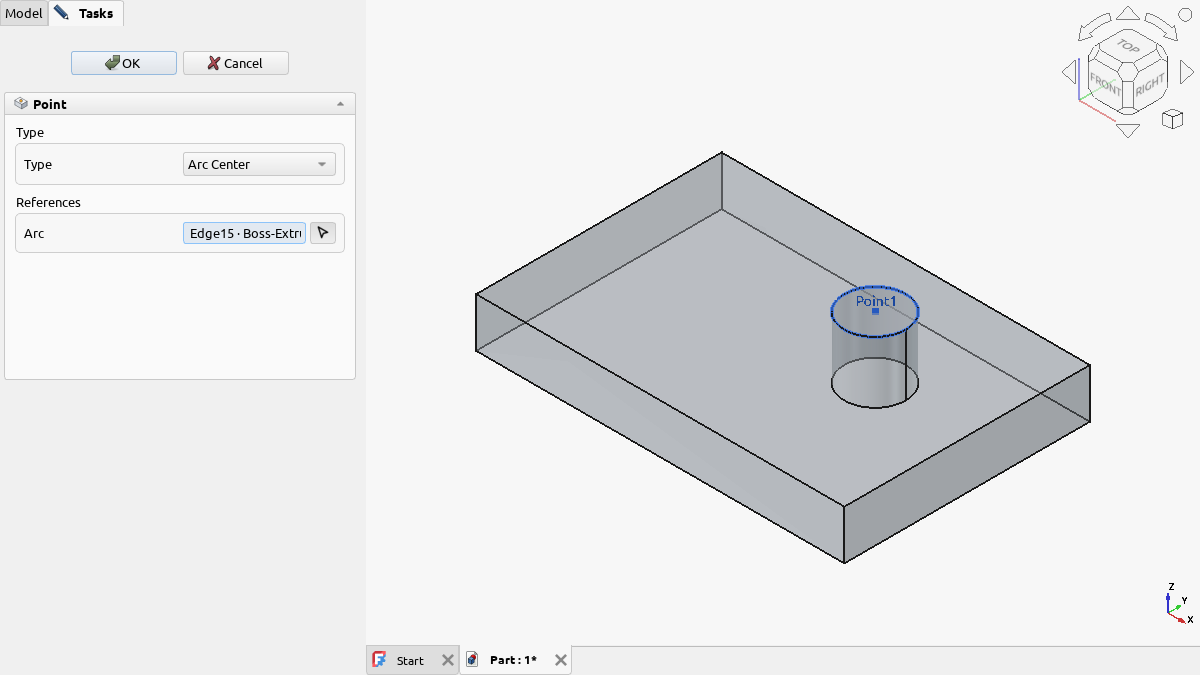
How to use it
- Select the reference (an arc, a face, an edge and a face...).
- Click Point. It picks the Type that fits; choose another if you need.
- Click OK.
Where to find it
- The Reference Geometry toolbar, in the Reference Geometry drop-down.
- Solid Design → Reference Geometry → Point
- Insert → Reference Geometry → Point
- Command search: press / in the 3D view and type its name.
- The command line: : then
point(below).
The panel
Every control's tooltip says the same as here: hover over it in FreeCAD. OK (or Enter) makes the feature, Cancel (or Esc) leaves the model as it was.
Type
| Control | Kind | What it does |
|---|---|---|
| Type | One of: Arc Center, Center of Face, Intersection, Projection, On Point, Along Curve Distance | How the point is defined; the references below follow from it |
References
| Control | Kind | What it does |
|---|---|---|
| Arc | Selection box: click a circular edge | A reference the point is built from |
| Reference 2 | Selection box | A reference the point is built from (shown for some choices only) |
| Reference 3 | Selection box | A reference the point is built from (shown for some choices only) |
Options
Shown only for some choices above.
| Control | Kind | What it does |
|---|---|---|
| Distance | A length | Distance along the edge from its start (shown for some choices only) |
| From the other end | A check box | Measure the distance from the edge's other end (shown for some choices only) |
On the command line
Press : in the 3D view and type point, then what to set. See the command line for how it works.
Options it takes
| Option | How to type it | What it is |
|---|---|---|
Type |
a word: arccenter, centerofface, intersection, projection, onpoint, alongcurvedistance |
How it is defined |
Flip |
flip turns it on, flip=no off |
Flip |
Distance |
distance=a value |
Distance along the curve (Along Curve Distance) |
Properties
All properties
What the feature stores, as the Property editor shows it (select the feature in the tree, then the Data tab). The panel sets these for you.
| Property | Kind | Default | What it is |
|---|---|---|---|
Type |
Choice | Arc Center | How it is defined Choices: Arc Center, Center of Face, Intersection, Projection, On Point, Along Curve Distance. |
Reference1 |
Picks | – | Reference 1 |
Reference2 |
Picks | – | Reference 2 |
Reference3 |
Picks | – | Reference 3 |
Flip |
Yes/No | No | Flip |
Distance |
Length | 10 mm | Distance along the curve (Along Curve Distance) |