Draft
 Tapers faces by an angle so the part releases from a mould: about a neutral plane, or about parting lines.
Draft tapers faces by an angle so a moulded or cast part comes out of its mould.
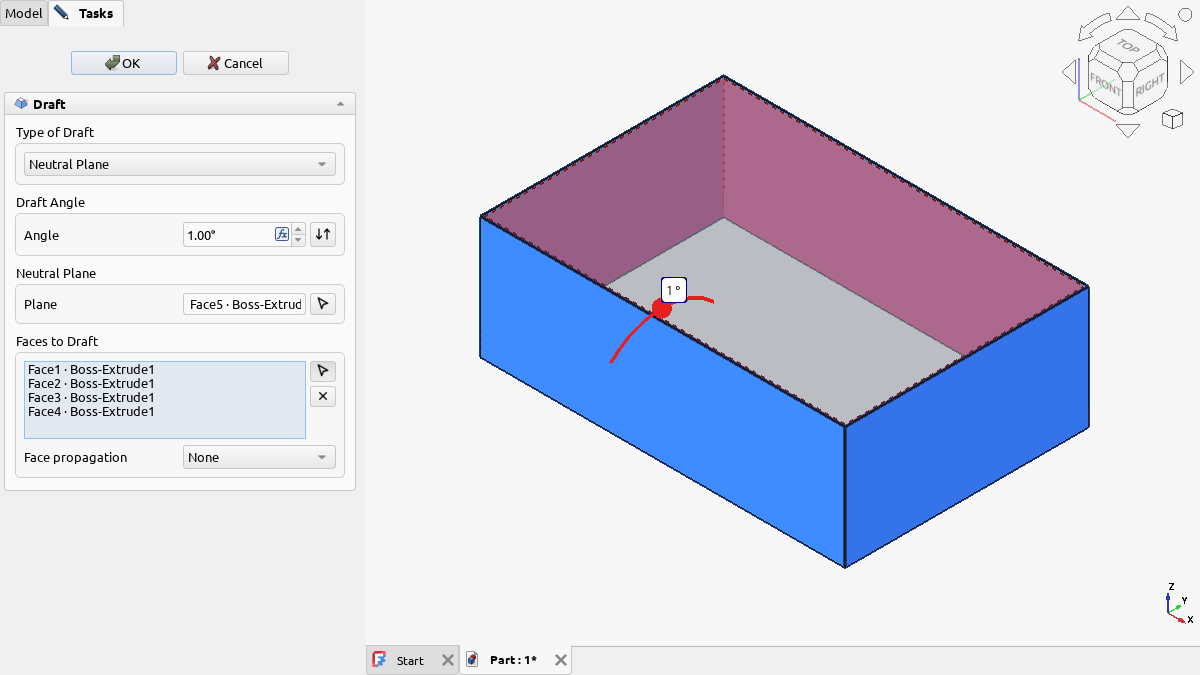
How to use it
- Select the faces to taper.
- Click Draft.
- With Neutral Plane, click the face or plane that stays the same size; the faces taper away from it. With Parting Line, pick the direction of pull and the edges where the mould splits.
- Set the Angle (or drag the handle), then click OK.
Good to know
- Type of Draft also has Step Draft and DraftXpert, as in SolidWorks.
- Face propagation adds faces tangent to (or all round) the ones you picked.
Where to find it
- The Features toolbar.
- Solid Design → Features → Draft
- Insert → Features → Draft
- Command search: press / in the 3D view and type its name.
- The command line: : then
draft(below).
The panel
Every control's tooltip says the same as here: hover over it in FreeCAD. OK (or Enter) makes the feature, Cancel (or Esc) leaves the model as it was.
Type of Draft
| Control | Kind | What it does |
|---|---|---|
| One of: Neutral Plane, Parting Line, Step Draft, DraftXpert | Neutral Plane: faces turn about where they meet a plane. Parting Line: faces turn about the edges you pick. Step Draft: parting lines at several heights, each step turning about its own lines. DraftXpert: a neutral plane; the faces that need draft are found for you, and faces that can't be drafted are left out and listed. |
Draft Angle
| Control | Kind | What it does |
|---|---|---|
| Angle | An angle | How far the faces lean. The part gets narrower along the direction of pull. (a flip button beside it) |
Neutral Plane
| Control | Kind | What it does |
|---|---|---|
| Plane | Selection box: click a plane or planar face | The faces turn about where they meet this plane. Its normal is the direction of pull, pointing away from it into the faces. |
Direction of Pull
Shown only for some choices above.
| Control | Kind | What it does |
|---|---|---|
| Direction | Selection box: click an edge, axis or face | The direction the mould opens: a straight edge, an axis, or a face (its normal). Empty: normal to the parting lines. |
Parting Lines
Shown only for some choices above.
| Control | Kind | What it does |
|---|---|---|
| Edges | Selection list: click edges | The edges the faces turn about: in one plane, or (Step Draft) square to the pull at several heights. Click an edge again to take it out. |
| Other face | A check box | Draft the faces on the other side of the parting lines |
| Face propagation | One of: None, Along Tangent | Faces added to the ones next to the parting lines |
Faces to Draft
| Control | Kind | What it does |
|---|---|---|
| Faces | Selection list: click faces | The faces to lean. Click a face again to take it out. |
| Face propagation | One of: None, Along Tangent, All Faces, Inner Faces, Outer Faces | Faces added to the ones you picked |
Draft Analysis
How much draft the faces have now, for this angle and direction of pull
Shown only for some choices above.
| Control | Kind | What it does |
|---|---|---|
| Pick the Faces That Need Draft | A button | Put every face with too little draft in Faces to Draft |
Drag handles
While the panel is open, drag the handles in the 3D view to set Angle, or click a handle's value and type. The same handles show when you select the feature in the tree, so you can change it without opening the panel. See drag handles.
On the command line
Press : in the 3D view and type draft, then what to set. See the command line for how it works.
Values typed straight after the name set, in order: Angle. For example :draft 1.
Options it takes
| Option | How to type it | What it is |
|---|---|---|
DraftType |
a word: neutralplane, partingline, stepdraft, draftxpert |
Neutral Plane or Parting Line |
Angle |
angle=a value |
Draft angle |
ReverseDirection |
reversedirection turns it on, reversedirection=no off |
Reverse the direction of pull |
OtherFace |
otherface turns it on, otherface=no off |
Parting Line: draft the faces on the other side |
FacePropagation |
a word: none, alongtangent, allfaces, innerfaces, outerfaces |
Faces added to the picked ones |
Properties
All properties
What the feature stores, as the Property editor shows it (select the feature in the tree, then the Data tab). The panel sets these for you.
| Property | Kind | Default | What it is |
|---|---|---|---|
DraftType |
Choice | Neutral Plane | Neutral Plane or Parting Line Choices: Neutral Plane, Parting Line, Step Draft, DraftXpert. |
Angle |
Angle | 1° | Draft angle |
NeutralPlane |
Picks | – | Neutral plane: a plane or planar face |
Items |
Picks | – | Faces to draft |
PartingLines |
Picks | – | Parting lines (edges) |
PullDirection |
Picks | – | Direction of pull: an edge, axis, plane or face (empty: from the plane) |
ReverseDirection |
Yes/No | No | Reverse the direction of pull |
OtherFace |
Yes/No | No | Parting Line: draft the faces on the other side |
FacePropagation |
Choice | None | Faces added to the picked ones Choices: None, Along Tangent, All Faces, Inner Faces, Outer Faces. |