Wrap
 Wraps a sketch onto a cylindrical or flat face: emboss, deboss or scribe it.
Wrap puts a sketch onto a face: lettering round a bottle, grip lines on a handle, a logo on a curved panel.
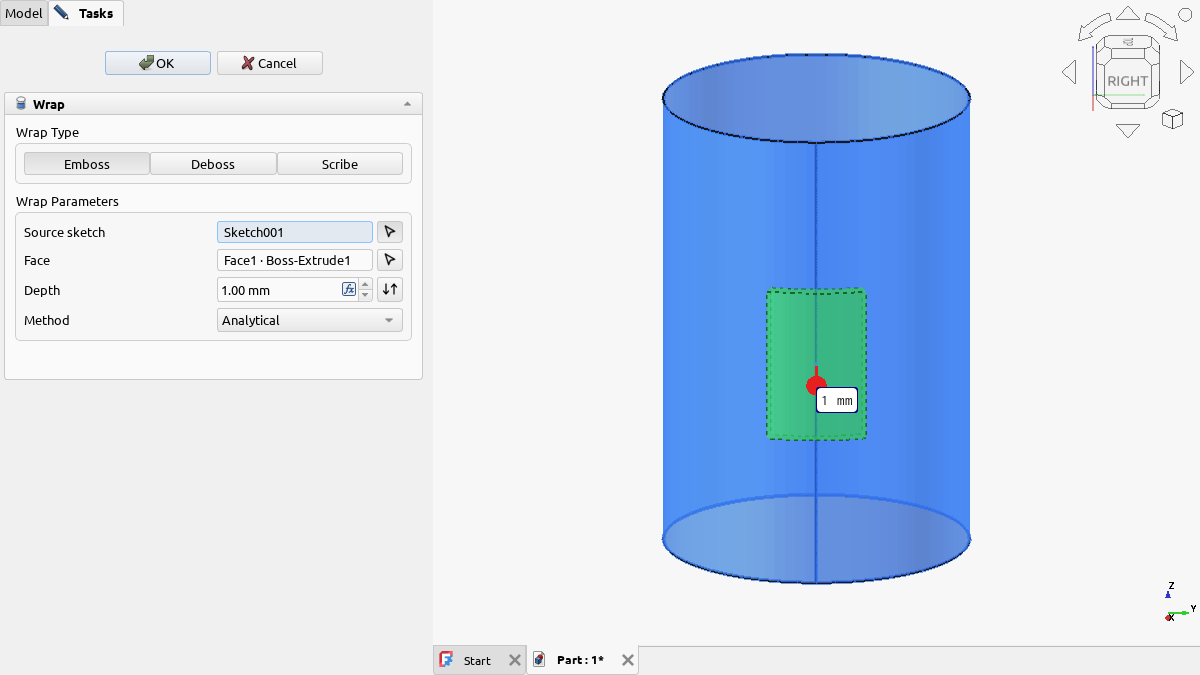
How to use it
- Draw the sketch on a plane beside the face (tangent to a cylinder, or parallel to a flat face).
- Select the sketch and the face, then click Wrap.
- Choose Emboss (raised), Deboss (sunk) or Scribe (split lines only), and set the Depth.
- Click OK.
Where to find it
- The Features toolbar.
- Solid Design → Features → Wrap
- Insert → Features → Wrap
- Command search: press / in the 3D view and type its name.
- The command line: : then
wrap(below).
The panel
Every control's tooltip says the same as here: hover over it in FreeCAD. OK (or Enter) makes the feature, Cancel (or Esc) leaves the model as it was.
Wrap Type
| Control | Kind | What it does |
|---|---|---|
| **Emboss \ | Deboss \ | Scribe** |
Wrap Parameters
| Control | Kind | What it does |
|---|---|---|
| Source sketch | Selection box: click a sketch | The sketch to wrap: on a plane along the cylinder's axis, or parallel to a flat face |
| Face | Selection box: click a face | The cylindrical or flat face to wrap onto |
| Depth | A length | How far it stands up or sinks in (a flip button beside it) |
| Method | One of: Analytical, Spline Surface | Analytical: rolled round a cylinder or cone without stretching (flat faces: projected). Spline Surface: projected onto any face along the sketch's normal |
Drag handles
While the panel is open, drag the handles in the 3D view to set Depth, or click a handle's value and type. The same handles show when you select the feature in the tree, so you can change it without opening the panel. See drag handles.
On the command line
Press : in the 3D view and type wrap, then what to set. See the command line for how it works.
Values typed straight after the name set, in order: Depth. For example :wrap 1.
Options it takes
| Option | How to type it | What it is |
|---|---|---|
WrapType |
a word: emboss, deboss, scribe |
Emboss raises the sketch, Deboss sinks it, Scribe splits the face along it |
Depth |
depth=a value |
How far it stands up or sinks in |
ReverseDirection |
reversedirection turns it on, reversedirection=no off |
The other way |
WrapMethod |
a word: analytical, splinesurface |
Analytical: rolled round a cylinder or cone (flat faces: projected). Spline Surface: projected onto any face |
Properties
All properties
What the feature stores, as the Property editor shows it (select the feature in the tree, then the Data tab). The panel sets these for you.
| Property | Kind | Default | What it is |
|---|---|---|---|
WrapType |
Choice | Emboss | Emboss raises the sketch, Deboss sinks it, Scribe splits the face along it Choices: Emboss, Deboss, Scribe. |
Sketch |
Object | – | The sketch to wrap |
Items |
Picks | – | The face to wrap onto |
Depth |
Length | 1 mm | How far it stands up or sinks in |
ReverseDirection |
Yes/No | No | The other way |
WrapMethod |
Choice | Analytical | Analytical: rolled round a cylinder or cone (flat faces: projected). Spline Surface: projected onto any face Choices: Analytical, Spline Surface. |