Move/Copy Body
 Moves or copies bodies by a translation and a rotation.
Move/Copy Body moves bodies, or copies them, by a distance and a rotation, or by mating them to other geometry.
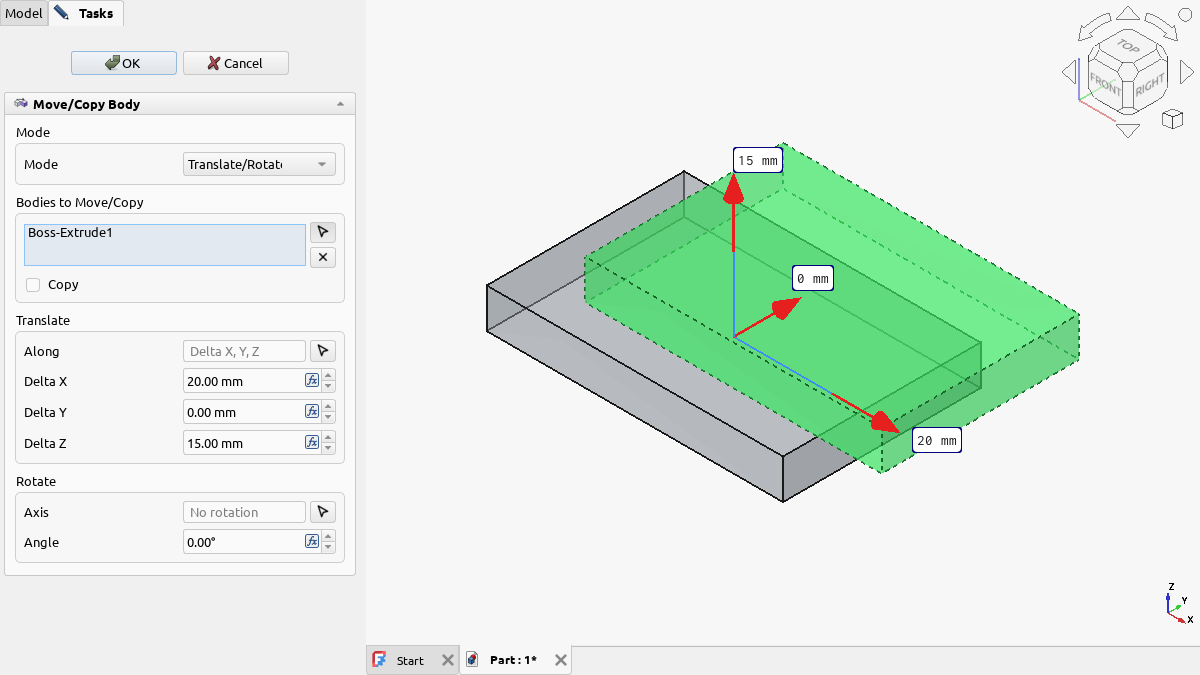
How to use it
- Select the bodies and click Move/Copy Body.
- Tick Copy to leave the original where it is.
- Type Delta X, Delta Y and Delta Z, or drag the arrows; pick an Axis and an Angle to turn them.
- Click OK.
Good to know
- The Mode switch has a second way: Constraints, which places a body by mating its faces and edges to others, as SolidWorks' Move/Copy Body does.
Where to find it
- The Bodies toolbar.
- Solid Design → Bodies → Move/Copy Body
- Insert → Features → Move/Copy Body
- Command search: press / in the 3D view and type its name.
- The command line: : then
movecopybody(below).
The panel
Every control's tooltip says the same as here: hover over it in FreeCAD. OK (or Enter) makes the feature, Cancel (or Esc) leaves the model as it was.
Mode
| Control | Kind | What it does |
|---|---|---|
| Mode | One of: Translate/Rotate, Constraints | Translate/Rotate: move by distances and angles. Constraints: place the bodies by mating their faces, edges and points to others. |
Bodies to Move/Copy
| Control | Kind | What it does |
|---|---|---|
| Bodies | Selection list: click bodies in the 3D view or tree | The bodies to move or copy |
| Copy | A check box | Leave the bodies where they are and move copies of them |
| Number of copies | A count | How many copies, each one step further on (shown for some choices only) |
Translate
| Control | Kind | What it does |
|---|---|---|
| Along | Selection box: click an edge or axis | Move along this edge or axis by the distance. Empty: move by Delta X, Y and Z. |
| Distance | A length | How far to move along the edge or axis (a flip button beside it; shown for some choices only) |
| Delta X | A length | Distance to move along X |
| Delta Y | A length | Distance to move along Y |
| Delta Z | A length | Distance to move along Z |
Rotate
| Control | Kind | What it does |
|---|---|---|
| Axis | Selection box: click an axis or edge | The axis to turn the bodies about: an axis, a straight edge or a round face |
| Angle | An angle | How far to turn the bodies |
Constraint 1
Shown only for some choices above.
| Control | Kind | What it does |
|---|---|---|
| Type | One of: None, Coincident, Parallel, Perpendicular, Distance, Angle, Concentric | Coincident, Parallel, Perpendicular, Distance, Angle or Concentric. All the constraints are met together. |
| Moving | Selection box: click a moving body | A face, edge or vertex of a body being moved (shown for some choices only) |
| Against | Selection box: click what it goes against | The face, edge or point it goes against, on a body that isn't moved (shown for some choices only) |
| Value | A number | The distance or angle between them (shown for some choices only) |
| Flip alignment | A check box | Face the other way: aligned instead of opposed (shown for some choices only) |
Constraint 2
Shown only for some choices above.
| Control | Kind | What it does |
|---|---|---|
| Type | One of: None, Coincident, Parallel, Perpendicular, Distance, Angle, Concentric | Coincident, Parallel, Perpendicular, Distance, Angle or Concentric. All the constraints are met together. |
| Moving | Selection box: click a moving body | A face, edge or vertex of a body being moved (shown for some choices only) |
| Against | Selection box: click what it goes against | The face, edge or point it goes against, on a body that isn't moved (shown for some choices only) |
| Value | A number | The distance or angle between them (shown for some choices only) |
| Flip alignment | A check box | Face the other way: aligned instead of opposed (shown for some choices only) |
Constraint 3
Shown only for some choices above.
| Control | Kind | What it does |
|---|---|---|
| Type | One of: None, Coincident, Parallel, Perpendicular, Distance, Angle, Concentric | Coincident, Parallel, Perpendicular, Distance, Angle or Concentric. All the constraints are met together. |
| Moving | Selection box: click a moving body | A face, edge or vertex of a body being moved (shown for some choices only) |
| Against | Selection box: click what it goes against | The face, edge or point it goes against, on a body that isn't moved (shown for some choices only) |
| Value | A number | The distance or angle between them (shown for some choices only) |
| Flip alignment | A check box | Face the other way: aligned instead of opposed (shown for some choices only) |
Constraint 4
Shown only for some choices above.
| Control | Kind | What it does |
|---|---|---|
| Type | One of: None, Coincident, Parallel, Perpendicular, Distance, Angle, Concentric | Coincident, Parallel, Perpendicular, Distance, Angle or Concentric. All the constraints are met together. |
| Moving | Selection box: click a moving body | A face, edge or vertex of a body being moved (shown for some choices only) |
| Against | Selection box: click what it goes against | The face, edge or point it goes against, on a body that isn't moved (shown for some choices only) |
| Value | A number | The distance or angle between them (shown for some choices only) |
| Flip alignment | A check box | Face the other way: aligned instead of opposed (shown for some choices only) |
Constraint 5
Shown only for some choices above.
| Control | Kind | What it does |
|---|---|---|
| Type | One of: None, Coincident, Parallel, Perpendicular, Distance, Angle, Concentric | Coincident, Parallel, Perpendicular, Distance, Angle or Concentric. All the constraints are met together. |
| Moving | Selection box: click a moving body | A face, edge or vertex of a body being moved (shown for some choices only) |
| Against | Selection box: click what it goes against | The face, edge or point it goes against, on a body that isn't moved (shown for some choices only) |
| Value | A number | The distance or angle between them (shown for some choices only) |
| Flip alignment | A check box | Face the other way: aligned instead of opposed (shown for some choices only) |
Constraint 6
Shown only for some choices above.
| Control | Kind | What it does |
|---|---|---|
| Type | One of: None, Coincident, Parallel, Perpendicular, Distance, Angle, Concentric | Coincident, Parallel, Perpendicular, Distance, Angle or Concentric. All the constraints are met together. |
| Moving | Selection box: click a moving body | A face, edge or vertex of a body being moved (shown for some choices only) |
| Against | Selection box: click what it goes against | The face, edge or point it goes against, on a body that isn't moved (shown for some choices only) |
| Value | A number | The distance or angle between them (shown for some choices only) |
| Flip alignment | A check box | Face the other way: aligned instead of opposed (shown for some choices only) |
Drag handles
While the panel is open, drag the handles in the 3D view to set DeltaX, DeltaY, DeltaZ, or click a handle's value and type. The same handles show when you select the feature in the tree, so you can change it without opening the panel. See drag handles.
On the command line
Press : in the 3D view and type movecopybody, then what to set. See the command line for how it works.
Values typed straight after the name set, in order: DeltaX, DeltaY, DeltaZ. For example :movecopybody 0 0 0.
Options it takes
| Option | How to type it | What it is |
|---|---|---|
Copy |
copy turns it on, copy=no off |
Copy instead of moving |
Copies |
copies=a whole number |
Number of copies |
TranslateDistance |
translatedistance=a value |
Distance along the reference |
DeltaX |
deltax=a value |
Delta X |
DeltaY |
deltay=a value |
Delta Y |
DeltaZ |
deltaz=a value |
Delta Z |
ReverseTranslate |
reversetranslate turns it on, reversetranslate=no off |
Reverse direction |
Angle |
angle=a value |
Rotation angle |
MoveMode |
a word: translaterotate, constraints |
How the bodies are placed |
MateType1 |
a word: none, coincident, parallel, perpendicular, distance, angle, concentric |
Constraint 1 |
MateValue1 |
matevalue1=a value |
Constraint 1: distance (mm) or angle (degrees) |
MateFlip1 |
mateflip1 turns it on, mateflip1=no off |
Constraint 1: flip alignment |
MateType2 |
a word: none, coincident, parallel, perpendicular, distance, angle, concentric |
Constraint 2 |
MateValue2 |
matevalue2=a value |
Constraint 2: distance (mm) or angle (degrees) |
MateFlip2 |
mateflip2 turns it on, mateflip2=no off |
Constraint 2: flip alignment |
MateType3 |
a word: none, coincident, parallel, perpendicular, distance, angle, concentric |
Constraint 3 |
MateValue3 |
matevalue3=a value |
Constraint 3: distance (mm) or angle (degrees) |
MateFlip3 |
mateflip3 turns it on, mateflip3=no off |
Constraint 3: flip alignment |
MateType4 |
a word: none, coincident, parallel, perpendicular, distance, angle, concentric |
Constraint 4 |
MateValue4 |
matevalue4=a value |
Constraint 4: distance (mm) or angle (degrees) |
MateFlip4 |
mateflip4 turns it on, mateflip4=no off |
Constraint 4: flip alignment |
MateType5 |
a word: none, coincident, parallel, perpendicular, distance, angle, concentric |
Constraint 5 |
MateValue5 |
matevalue5=a value |
Constraint 5: distance (mm) or angle (degrees) |
MateFlip5 |
mateflip5 turns it on, mateflip5=no off |
Constraint 5: flip alignment |
MateType6 |
a word: none, coincident, parallel, perpendicular, distance, angle, concentric |
Constraint 6 |
MateValue6 |
matevalue6=a value |
Constraint 6: distance (mm) or angle (degrees) |
MateFlip6 |
mateflip6 turns it on, mateflip6=no off |
Constraint 6: flip alignment |
Properties
All properties
What the feature stores, as the Property editor shows it (select the feature in the tree, then the Data tab). The panel sets these for you.
| Property | Kind | Default | What it is |
|---|---|---|---|
Bodies |
List | – | Bodies to move or copy, by ID |
Copy |
Yes/No | No | Copy instead of moving |
Copies |
Whole number | 1 | Number of copies |
TranslateReference |
Picks | – | Edge or axis to translate along (instead of Delta X/Y/Z) |
TranslateDistance |
Length | 0 mm | Distance along the reference |
DeltaX |
Length | 0 mm | Delta X |
DeltaY |
Length | 0 mm | Delta Y |
DeltaZ |
Length | 0 mm | Delta Z |
ReverseTranslate |
Yes/No | No | Reverse direction |
RotateReference |
Picks | – | Axis or edge to rotate about |
Angle |
Angle | 0° | Rotation angle |
MoveMode |
Choice | Translate/Rotate | How the bodies are placed Choices: Translate/Rotate, Constraints. |
MateType1 |
Choice | None | Constraint 1 Choices: None, Coincident, Parallel, Perpendicular, Distance, Angle, Concentric. |
MateMoving1 |
Picks | – | Constraint 1: face, edge or vertex of the moving bodies |
MateFixed1 |
Picks | – | Constraint 1: what it is placed against |
MateValue1 |
Number | 0 | Constraint 1: distance (mm) or angle (degrees) |
MateFlip1 |
Yes/No | No | Constraint 1: flip alignment |
MateType2 |
Choice | None | Constraint 2 Choices: None, Coincident, Parallel, Perpendicular, Distance, Angle, Concentric. |
MateMoving2 |
Picks | – | Constraint 2: face, edge or vertex of the moving bodies |
MateFixed2 |
Picks | – | Constraint 2: what it is placed against |
MateValue2 |
Number | 0 | Constraint 2: distance (mm) or angle (degrees) |
MateFlip2 |
Yes/No | No | Constraint 2: flip alignment |
MateType3 |
Choice | None | Constraint 3 Choices: None, Coincident, Parallel, Perpendicular, Distance, Angle, Concentric. |
MateMoving3 |
Picks | – | Constraint 3: face, edge or vertex of the moving bodies |
MateFixed3 |
Picks | – | Constraint 3: what it is placed against |
MateValue3 |
Number | 0 | Constraint 3: distance (mm) or angle (degrees) |
MateFlip3 |
Yes/No | No | Constraint 3: flip alignment |
MateType4 |
Choice | None | Constraint 4 Choices: None, Coincident, Parallel, Perpendicular, Distance, Angle, Concentric. |
MateMoving4 |
Picks | – | Constraint 4: face, edge or vertex of the moving bodies |
MateFixed4 |
Picks | – | Constraint 4: what it is placed against |
MateValue4 |
Number | 0 | Constraint 4: distance (mm) or angle (degrees) |
MateFlip4 |
Yes/No | No | Constraint 4: flip alignment |
MateType5 |
Choice | None | Constraint 5 Choices: None, Coincident, Parallel, Perpendicular, Distance, Angle, Concentric. |
MateMoving5 |
Picks | – | Constraint 5: face, edge or vertex of the moving bodies |
MateFixed5 |
Picks | – | Constraint 5: what it is placed against |
MateValue5 |
Number | 0 | Constraint 5: distance (mm) or angle (degrees) |
MateFlip5 |
Yes/No | No | Constraint 5: flip alignment |
MateType6 |
Choice | None | Constraint 6 Choices: None, Coincident, Parallel, Perpendicular, Distance, Angle, Concentric. |
MateMoving6 |
Picks | – | Constraint 6: face, edge or vertex of the moving bodies |
MateFixed6 |
Picks | – | Constraint 6: what it is placed against |
MateValue6 |
Number | 0 | Constraint 6: distance (mm) or angle (degrees) |
MateFlip6 |
Yes/No | No | Constraint 6: flip alignment |