Hole Wizard
 Inserts holes of a standard type and size at points on a face or a sketch.
Hole Wizard makes standard holes at the right size for a fastener: counterbored, countersunk, plain, tapped, and slots, in ISO and ANSI Inch sizes.
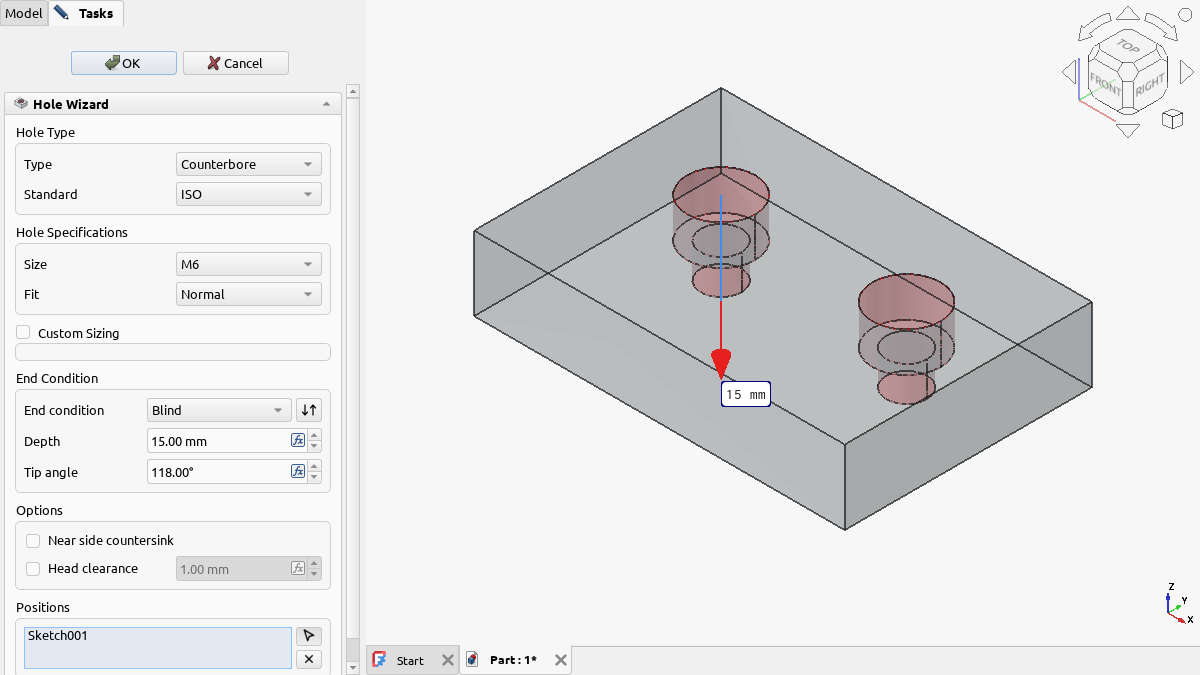
How to use it
- Click Hole Wizard.
- Choose the hole Type, Standard, Size and Fit.
- Set the End Condition (Blind with its depth, Through All...).
- Click on a face where each hole goes. Each click adds a position; you can also pick a sketch with points.
- Click OK.
Good to know
- Tapped holes can be drilled at the tap drill size, at the thread size, or with a modelled thread.
- Custom Sizing overrides the table's sizes. The Options group adds near and far side countersinks and head clearance.
Where to find it
- The Features toolbar.
- Solid Design → Features → Hole Wizard
- Insert → Features → Hole Wizard
- Command search: press / in the 3D view and type its name.
- The command line: : then
holewizard(below).
The panel
Every control's tooltip says the same as here: hover over it in FreeCAD. OK (or Enter) makes the feature, Cancel (or Esc) leaves the model as it was.
Hole Type
| Control | Kind | What it does |
|---|---|---|
| Type | One of: Counterbore, Countersink, Hole, Straight Tap, Tapered Tap, Counterbore Slot, Countersink Slot, Slot, Advanced, Legacy | Counterbore, countersink, plain or tapped hole, or a slot |
| Standard | One of: ISO, ANSI Inch | The standard the sizes come from: ISO, or ANSI Inch |
Hole Specifications
| Control | Kind | What it does |
|---|---|---|
| Size | One of: M2, M2.5, M3, M4, M5, M6, M8, M10, M12, M16, M20 | The fastener size |
| Fit | One of: Close, Normal, Loose | Close, normal or loose clearance for the fastener |
| Thread | One of: Tap Drill Diameter, Thread Diameter, Modelled Thread | Tap Drill Diameter: the drilled hole. Thread Diameter: the hole at the thread's size. Modelled Thread: the helical thread cut into it. (shown for some choices only) |
| Slot length | A length | Slot length, centre to centre (shown for some choices only) |
| Slot angle | An angle | Slot direction, from the sketch's X axis (shown for some choices only) |
Legacy Hole
An older hole type, sized by its own dimensions
Shown only for some choices above.
| Control | Kind | What it does |
|---|---|---|
| Type | One of: Simple, Tapered, Counterbored, Countersunk, Counterdrilled | Simple, Tapered, Counterbored, Countersunk or Counterdrilled |
| Taper angle | An angle | Tapered: how far the wall leans (shown for some choices only) |
| Counterdrill angle | An angle | Counterdrilled: the cone down to the hole (shown for some choices only) |
Custom Sizing
Use your own dimensions instead of the standard's
Optional: tick its title to use it.
| Control | Kind | What it does |
|---|---|---|
| Hole diameter | A length | Diameter of the hole (shown for some choices only) |
| Counterbore diameter | A length | Diameter of the counterbore (shown for some choices only) |
| Counterbore depth | A length | Depth of the counterbore (shown for some choices only) |
| Countersink diameter | A length | Diameter of the countersink at the face (shown for some choices only) |
| Countersink angle | An angle | Included angle of the countersink (shown for some choices only) |
End Condition
| Control | Kind | What it does |
|---|---|---|
| End condition | One of: Blind, Through All, Up To Next, Up To Vertex, Up To Surface, Offset From Surface | Blind: to a depth. Through All: through everything. Up To Next: through the first body it meets. Up To Vertex, Up To Surface, Offset From Surface: to what you pick. (a flip button beside it) |
| Depth | A length | Depth of the hole |
| Tip angle | An angle | Angle of the drill point at the bottom (0: flat) |
| Thread depth | A length | How deep the modelled thread goes (shown for some choices only) |
| Up to | Selection box: click a face, plane or vertex | The vertex, face or plane the holes go up to (shown for some choices only) |
| Offset | A length | How far before the surface the holes stop (shown for some choices only) |
Options
| Control | Kind | What it does |
|---|---|---|
| Near side countersink | A check box | A countersink where the hole starts |
| Diameter | A length | Diameter of the countersink at the face (shown for some choices only) |
| Angle | An angle | Included angle of the countersink (shown for some choices only) |
| Far side countersink | A check box | A countersink where the hole comes out (Through All, Up To Next) (shown for some choices only) |
| Diameter | A length | Diameter of the countersink at the face (shown for some choices only) |
| Angle | An angle | Included angle of the countersink (shown for some choices only) |
| Head clearance | A length | Carry the counterbore or countersink up above the face, so the screw head has room (tick it to use it) |
Near Side Elements
Advanced: the steps of the hole from the face down; the last one runs to the end condition
Shown only for some choices above.
| Control | Kind | What it does |
|---|---|---|
| A list | From the face down. The last element runs to the end condition. | |
| Add | A button | (a Remove button; a Up button; a Down button) |
| Element | One of: Counterbore, Countersink, Hole, Tapered | Counterbore or Hole: a straight step. Countersink: a cone down to the next element. Tapered: narrows by its angle. (shown for some choices only) |
| Diameter | A number | Diameter at the top of the element (shown for some choices only) |
| Depth | A number | How deep the element goes (shown for some choices only) |
| Angle | A number | Included angle (Countersink, Tapered) (shown for some choices only) |
Far Side Elements
Advanced: steps cut back from where the hole comes out (Through All, Up To Next)
Shown only for some choices above.
| Control | Kind | What it does |
|---|---|---|
| A list | From the exit face back up the hole | |
| Add | A button | (a Remove button; a Up button; a Down button) |
| Element | One of: Counterbore, Countersink, Hole, Tapered | Counterbore or Hole: a straight step. Countersink: a cone down to the next element. Tapered: narrows by its angle. (shown for some choices only) |
| Diameter | A number | Diameter at the top of the element (shown for some choices only) |
| Depth | A number | How deep the element goes (shown for some choices only) |
| Angle | A number | Included angle (Countersink, Tapered) (shown for some choices only) |
Positions
| Control | Kind | What it does |
|---|---|---|
| Positions | Selection list: click on a face to add a hole | Click on a planar face to add a hole there, or pick a sketch whose points are the hole centres |
Drag handles
While the panel is open, drag the handles in the 3D view to set Depth, or click a handle's value and type. The same handles show when you select the feature in the tree, so you can change it without opening the panel. See drag handles.
On the command line
Press : in the 3D view and type holewizard, then what to set. See the command line for how it works.
Values typed straight after the name set, in order: Depth. For example :holewizard 15.
Options it takes
| Option | How to type it | What it is |
|---|---|---|
HoleType |
a word: counterbore, countersink, hole, straighttap, taperedtap, counterboreslot, countersinkslot, slot, advanced, legacy |
Hole type |
Standard |
a word: iso, ansiinch |
Standard |
Size |
a word: m2, m25, m3, m4, m5, m6, m8, m10, m12, m16, m20 |
Size |
Fit |
a word: close, normal, loose |
Fit |
EndCondition |
a word: blind, throughall, uptonext, uptovertex, uptosurface, offsetfromsurface |
End condition |
Depth |
depth=a value |
Blind depth |
TipAngle |
tipangle=a value |
Drill tip angle (0: flat) |
Reverse |
reverse turns it on, reverse=no off |
Reverse Direction |
OffsetDistance |
offsetdistance=a value |
Offset From Surface distance |
SlotLength |
slotlength=a value |
Slot length, centre to centre |
SlotAngle |
slotangle=a value |
Slot direction from the sketch's X axis |
ThreadOption |
a word: tapdrilldiameter, threaddiameter, modelledthread |
Straight Tap: the tap drill, the thread's diameter, or a modelled thread |
ThreadDepth |
threaddepth=a value |
Thread depth (Blind) |
CustomSizing |
customsizing turns it on, customsizing=no off |
Use your own dimensions |
HoleDiameter |
holediameter=a value |
Hole diameter |
CboreDiameter |
cborediameter=a value |
Counterbore diameter |
CboreDepth |
cboredepth=a value |
Counterbore depth |
CskDiameter |
cskdiameter=a value |
Countersink diameter |
CskAngle |
cskangle=a value |
Countersink angle |
LegacyType |
a word: simple, tapered, counterbored, countersunk, counterdrilled |
Legacy hole: Simple, Tapered, Counterbored, Countersunk or Counterdrilled |
TaperAngle |
taperangle=a value |
Legacy Tapered: the wall's angle |
CdrillAngle |
cdrillangle=a value |
Legacy Counterdrilled: the cone from the counterdrill down to the hole |
NearSideCsk |
nearsidecsk turns it on, nearsidecsk=no off |
Near side countersink |
NearCskDiameter |
nearcskdiameter=a value |
Near side countersink diameter |
NearCskAngle |
nearcskangle=a value |
Near side countersink angle |
FarSideCsk |
farsidecsk turns it on, farsidecsk=no off |
Far side countersink (Through All, Up To Next) |
FarCskDiameter |
farcskdiameter=a value |
Far side countersink diameter |
FarCskAngle |
farcskangle=a value |
Far side countersink angle |
HeadClearance |
headclearance turns it on, headclearance=no off |
Head clearance (Counterbore, Countersink) |
HeadClearanceValue |
headclearancevalue=a value |
Head clearance |
Properties
All properties
What the feature stores, as the Property editor shows it (select the feature in the tree, then the Data tab). The panel sets these for you.
| Property | Kind | Default | What it is |
|---|---|---|---|
HoleType |
Choice | Counterbore | Hole type Choices: Counterbore, Countersink, Hole, Straight Tap, Tapered Tap, Counterbore Slot, Countersink Slot, Slot, Advanced, Legacy. |
Standard |
Choice | ISO | Standard Choices: ISO, ANSI Inch. |
Size |
Choice | M2 | Size Choices: M2, M2.5, M3, M4, M5, M6, M8, M10, M12, M16, M20. |
Fit |
Choice | Normal | Fit Choices: Close, Normal, Loose. |
EndCondition |
Choice | Blind | End condition Choices: Blind, Through All, Up To Next, Up To Vertex, Up To Surface, Offset From Surface. |
Depth |
Length | 15 mm | Blind depth |
TipAngle |
Angle | 118° | Drill tip angle (0: flat) |
Reverse |
Yes/No | No | Reverse Direction |
UpTo |
Picks | – | Vertex, face or plane (Up To Vertex, Up To Surface, Offset From Surface) |
OffsetDistance |
Length | 1 mm | Offset From Surface distance |
SlotLength |
Length | 10 mm | Slot length, centre to centre |
SlotAngle |
Angle | 0° | Slot direction from the sketch's X axis |
ThreadOption |
Choice | Tap Drill Diameter | Straight Tap: the tap drill, the thread's diameter, or a modelled thread Choices: Tap Drill Diameter, Thread Diameter, Modelled Thread. |
ThreadDepth |
Length | 12 mm | Thread depth (Blind) |
CustomSizing |
Yes/No | No | Use your own dimensions |
HoleDiameter |
Length | 6.6 mm | Hole diameter |
CboreDiameter |
Length | 11 mm | Counterbore diameter |
CboreDepth |
Length | 6.4 mm | Counterbore depth |
CskDiameter |
Length | 13.44 mm | Countersink diameter |
CskAngle |
Angle | 90° | Countersink angle |
LegacyType |
Choice | Simple | Legacy hole: Simple, Tapered, Counterbored, Countersunk or Counterdrilled Choices: Simple, Tapered, Counterbored, Countersunk, Counterdrilled. |
TaperAngle |
Angle | 2° | Legacy Tapered: the wall's angle |
CdrillAngle |
Angle | 118° | Legacy Counterdrilled: the cone from the counterdrill down to the hole |
NearSideCsk |
Yes/No | No | Near side countersink |
NearCskDiameter |
Length | 10 mm | Near side countersink diameter |
NearCskAngle |
Angle | 90° | Near side countersink angle |
FarSideCsk |
Yes/No | No | Far side countersink (Through All, Up To Next) |
FarCskDiameter |
Length | 10 mm | Far side countersink diameter |
FarCskAngle |
Angle | 90° | Far side countersink angle |
HeadClearance |
Yes/No | No | Head clearance (Counterbore, Countersink) |
HeadClearanceValue |
Length | 1 mm | Head clearance |
NearElements |
List | – | Advanced: near side elements from the face down, as Kind|Diameter|Depth|Angle |
FarElements |
List | – | Advanced: far side elements from the exit face up, as Kind|Diameter|Depth|Angle |
Sketch |
Object | – | Sketch whose points place the holes |