Variable Pattern
 Repeats a feature with its dimensions changed per instance, from a table: position, size or depth.
Variable Pattern copies a feature with its dimensions changed per copy, from a table: holes of growing size, ribs of falling height.
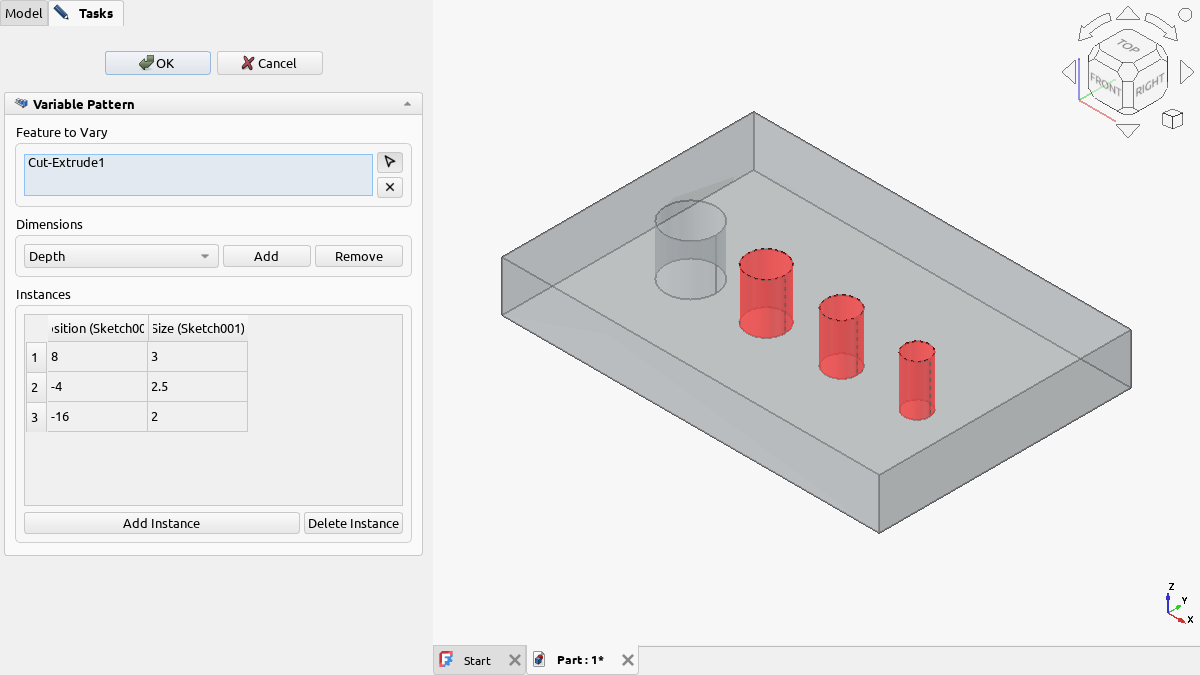
How to use it
- Give the dimensions you want to vary a name in the sketch (a named constraint), or use the feature's own (its depth).
- Select the feature and click Variable Pattern.
- Under Dimensions, pick a dimension and click Add; it becomes a column.
- Click Add Instance for each copy and type its values in the table.
- Click OK.
Where to find it
- The Features toolbar, in the Patterns drop-down.
- Solid Design → Patterns → Variable Pattern
- Insert → Pattern/Mirror → Variable Pattern
- Command search: press / in the 3D view and type its name.
- The command line: : then
variablepattern.
The panel
Every control's tooltip says the same as here: hover over it in FreeCAD. OK (or Enter) makes the feature, Cancel (or Esc) leaves the model as it was.
Feature to Vary
An Extrude or a Revolve
| Control | Kind | What it does |
|---|---|---|
| Features | Selection list: click features in the tree, or their faces | The feature to vary: click it in the tree, or a face it made |
Dimensions
The feature's own, and its sketch's named dimensions
| Control | Kind | What it does |
|---|---|---|
| One of: Depth | Pick a dimension and Add it (a Add button; a Remove button) |
Instances
One row per instance; the original isn't in the table
| Control | Kind | What it does |
|---|---|---|
| A table: Position (Sketch001), Size (Sketch001) | Type each instance's values | |
| Add Instance | A button | Add or delete instances (a Delete Instance button) |
Properties
All properties
What the feature stores, as the Property editor shows it (select the feature in the tree, then the Data tab). The panel sets these for you.
| Property | Kind | Default | What it is |
|---|---|---|---|
Features |
Objects | – | Features to repeat |
Dimensions |
List | – | The dimensions each instance changes: a feature property (Depth) or a sketch dimension (Sketch:Name) |
Instances |
List | – | One row per instance: its values, in the Dimensions' order, separated by ; |