Thread
 Models a helical thread on a shaft or in a hole, starting at a circular edge: cut into it, or grown out of it.
Thread models a real helical thread on a shaft or in a hole, for 3D printing or close-up renders. For a drawing callout without the geometry, use Cosmetic Thread.
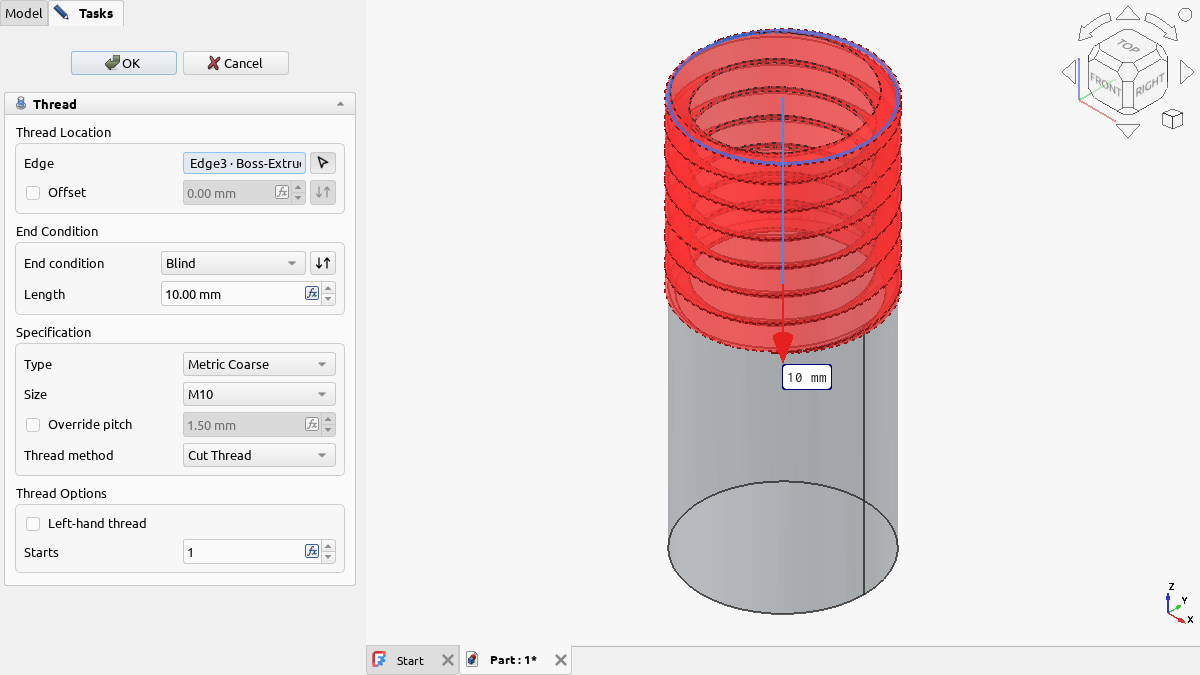
How to use it
- Select the circular edge where the thread starts (the end of a shaft, the rim of a hole).
- Click Thread. The size is set to the nearest standard one for the diameter.
- Set the End condition and Length, and the Thread method: Cut Thread cuts the groove in, Extrude Thread grows the ridge out.
- Click OK.
Good to know
- Override pitch sets a pitch of your own; Left-hand thread and Starts cover the rest.
- Threads are heavy geometry: model them last, or suppress them while you work.
Where to find it
- The Features toolbar, in the Threads drop-down.
- Solid Design → Features → Thread
- Command search: press / in the 3D view and type its name.
- The command line: : then
thread(below).
The panel
Every control's tooltip says the same as here: hover over it in FreeCAD. OK (or Enter) makes the feature, Cancel (or Esc) leaves the model as it was.
Thread Location
| Control | Kind | What it does |
|---|---|---|
| Edge | Selection box: click a circular edge | The circular edge the thread starts at: a shaft's end or a hole's rim |
| Offset | A length | Start the thread away from the edge (a flip button beside it; tick it to use it) |
End Condition
| Control | Kind | What it does |
|---|---|---|
| End condition | One of: Blind, Revolutions, Up To Selection | Blind: a length. Revolutions: a number of turns. Up To Selection: to a face, plane or vertex. (a flip button beside it) |
| Length | A length | Thread length |
| Revolutions | A number | Number of turns (shown for some choices only) |
| Up to | Selection box: click a face, plane or vertex | The face, plane or vertex the thread ends at (shown for some choices only) |
Specification
| Control | Kind | What it does |
|---|---|---|
| Type | One of: Metric Coarse, Metric Fine, Unified Coarse (UNC), Unified Fine (UNF) | The thread standard: ISO metric coarse or fine, or Unified inch coarse (UNC) or fine (UNF) |
| Size | One of: M1.6, M2, M2.5, M3, M4, M5, M6, M8, M10, M12, M14, M16, M18, M20, M22, M24, M27, M30, M33, M36 | The thread size; it starts at the one nearest the cylinder |
| Override pitch | A length | Use your own pitch instead of the size's (tick it to use it) |
| Thread method | One of: Cut Thread, Extrude Thread | Cut Thread: cut the groove into the cylinder. Extrude Thread: grow the ridge out of it. |
Thread Options
| Control | Kind | What it does |
|---|---|---|
| Left-hand thread | A check box | Turn the other way (off: a right-hand thread) |
| Starts | A count | Number of threads side by side (a multi-start thread) |
Drag handles
While the panel is open, drag the handles in the 3D view to set Length, or click a handle's value and type. The same handles show when you select the feature in the tree, so you can change it without opening the panel. See drag handles.
On the command line
Press : in the 3D view and type thread, then what to set. See the command line for how it works.
Values typed straight after the name set, in order: Length. For example :thread 10.
Options it takes
| Option | How to type it | What it is |
|---|---|---|
Offset |
offset turns it on, offset=no off |
Start the thread away from the edge |
OffsetDistance |
offsetdistance=a value |
How far from the edge |
ReverseOffset |
reverseoffset turns it on, reverseoffset=no off |
Offset the other way |
EndCondition |
a word: blind, revolutions, uptoselection |
How long the thread is |
Length |
length=a value |
Thread length (Blind) |
Revolutions |
revolutions=a value |
Number of turns (Revolutions) |
ReverseDirection |
reversedirection turns it on, reversedirection=no off |
Thread the other way along the cylinder from the edge |
Series |
a word: metriccoarse, metricfine, unifiedcoarseunc, unifiedfineunf |
Thread standard and series |
OverridePitch |
overridepitch turns it on, overridepitch=no off |
Use your own pitch |
Pitch |
pitch=a value |
Pitch (Override pitch) |
Method |
a word: cutthread, extrudethread |
Cut the groove or grow the ridge |
LeftHand |
lefthand turns it on, lefthand=no off |
Left-hand thread |
Starts |
starts=a whole number |
Number of starts |
Properties
All properties
What the feature stores, as the Property editor shows it (select the feature in the tree, then the Data tab). The panel sets these for you.
| Property | Kind | Default | What it is |
|---|---|---|---|
Edge |
Picks | – | The circular edge the thread starts at |
Offset |
Yes/No | No | Start the thread away from the edge |
OffsetDistance |
Length | 0 mm | How far from the edge |
ReverseOffset |
Yes/No | No | Offset the other way |
EndCondition |
Choice | Blind | How long the thread is Choices: Blind, Revolutions, Up To Selection. |
Length |
Length | 10 mm | Thread length (Blind) |
Revolutions |
Number | 5 | Number of turns (Revolutions) |
UpTo |
Picks | – | Face, plane or vertex (Up To Selection) |
ReverseDirection |
Yes/No | No | Thread the other way along the cylinder from the edge |
Series |
Choice | Metric Coarse | Thread standard and series Choices: Metric Coarse, Metric Fine, Unified Coarse (UNC), Unified Fine (UNF). |
Size |
Text | Thread size (empty: the nearest one) | |
OverridePitch |
Yes/No | No | Use your own pitch |
Pitch |
Length | 1 mm | Pitch (Override pitch) |
Method |
Choice | Cut Thread | Cut the groove or grow the ridge Choices: Cut Thread, Extrude Thread. |
LeftHand |
Yes/No | No | Left-hand thread |
Starts |
Whole number | 1 | Number of starts |