Rib
 Grows a wall of material from open sketch lines until it meets the model: in the sketch plane, or out of it.
Rib grows a wall from open sketch lines until it meets the model: stiffening ribs in a channel, gussets under a ledge. The line doesn't have to touch the walls; the rib runs on until it reaches them.
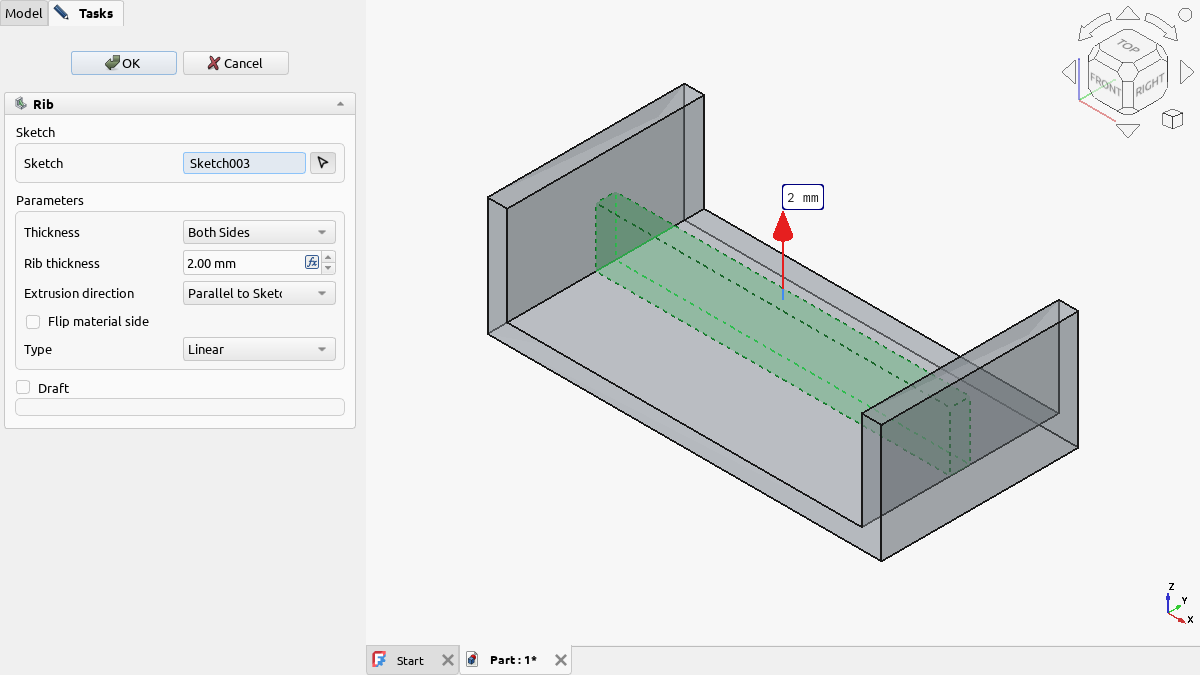
How to use it
- Draw the rib's line in a sketch.
- Select the sketch and click Rib.
- Choose the Extrusion direction: Parallel to Sketch (the rib lies in the sketch plane, from the line out to the model) or Normal to Sketch (it grows out of the sketch plane to the model).
- Set the Rib thickness, and under Thickness whether it is centred on the line (Both Sides) or to one side. Flip material side grows it the other way.
- Click OK.
Good to know
- Draft tapers the rib for moulding.
- Type says how the line's ends reach the model: Linear carries on along them, Natural carries arcs on round their circles.
Where to find it
- The Features toolbar.
- Solid Design → Features → Rib
- Insert → Features → Rib
- Command search: press / in the 3D view and type its name.
- The command line: : then
rib(below).
The panel
Every control's tooltip says the same as here: hover over it in FreeCAD. OK (or Enter) makes the feature, Cancel (or Esc) leaves the model as it was.
Sketch
| Control | Kind | What it does |
|---|---|---|
| Sketch | Selection box: click a sketch | The open sketch lines the rib is made from |
Parameters
| Control | Kind | What it does |
|---|---|---|
| Thickness | One of: First Side, Both Sides, Second Side | First Side or Second Side: the thickness goes to one side of the sketch line. Both Sides: centred on it. |
| Rib thickness | A length | How thick the rib is |
| Extrusion direction | One of: Parallel to Sketch, Normal to Sketch | Parallel to Sketch: the rib lies in the sketch plane, from the line to the model. Normal to Sketch: it grows out of the sketch plane to the model. |
| Flip material side | A check box | Grow the rib to the other side of the sketch line |
| Type | One of: Linear, Natural | How the ends reach the model. Linear: along their tangents. Natural: arcs carry on round their circles. |
Draft
Lean the rib's sides
Optional: tick its title to use it.
| Control | Kind | What it does |
|---|---|---|
| Angle | An angle | Draft angle (shown for some choices only) |
| Draft outward | A check box | Thicker towards the model; off: thinner (shown for some choices only) |
Drag handles
While the panel is open, drag the handles in the 3D view to set Thickness, or click a handle's value and type. The same handles show when you select the feature in the tree, so you can change it without opening the panel. See drag handles.
On the command line
Press : in the 3D view and type rib, then what to set. See the command line for how it works.
Values typed straight after the name set, in order: Thickness. For example :rib 2.
Options it takes
| Option | How to type it | What it is |
|---|---|---|
Thickness |
thickness=a value |
Rib thickness |
ThicknessSide |
a word: firstside, bothsides, secondside |
Which side of the sketch line the thickness goes |
ExtrusionDirection |
a word: paralleltosketch, normaltosketch |
Parallel to Sketch: the rib lies in the sketch plane. Normal to Sketch: it grows out of the plane. |
FlipMaterialSide |
flipmaterialside turns it on, flipmaterialside=no off |
Grow the rib to the other side of the sketch line |
ExtendType |
a word: linear, natural |
How the ends reach the model: Linear (along their tangents) or Natural (arcs carry on round their circles) |
Draft |
draft turns it on, draft=no off |
Lean the rib's sides |
DraftAngle |
draftangle=a value |
Draft angle |
DraftOutward |
draftoutward turns it on, draftoutward=no off |
Thicker towards the model (off: thinner) |
Properties
All properties
What the feature stores, as the Property editor shows it (select the feature in the tree, then the Data tab). The panel sets these for you.
| Property | Kind | Default | What it is |
|---|---|---|---|
Sketch |
Object | – | The rib's sketch (open lines) |
Thickness |
Length | 2 mm | Rib thickness |
ThicknessSide |
Choice | First Side | Which side of the sketch line the thickness goes Choices: First Side, Both Sides, Second Side. |
ExtrusionDirection |
Choice | Parallel to Sketch | Parallel to Sketch: the rib lies in the sketch plane. Normal to Sketch: it grows out of the plane. Choices: Parallel to Sketch, Normal to Sketch. |
FlipMaterialSide |
Yes/No | No | Grow the rib to the other side of the sketch line |
ExtendType |
Choice | Linear | How the ends reach the model: Linear (along their tangents) or Natural (arcs carry on round their circles) Choices: Linear, Natural. |
Draft |
Yes/No | No | Lean the rib's sides |
DraftAngle |
Angle | 1° | Draft angle |
DraftOutward |
Yes/No | No | Thicker towards the model (off: thinner) |