Untrim Surface
 A face back to the surface it lies on: holes filled, or grown past its edges.
Untrim Surface takes a face back to the surface it lies on: its holes filled, or grown out past its edges.
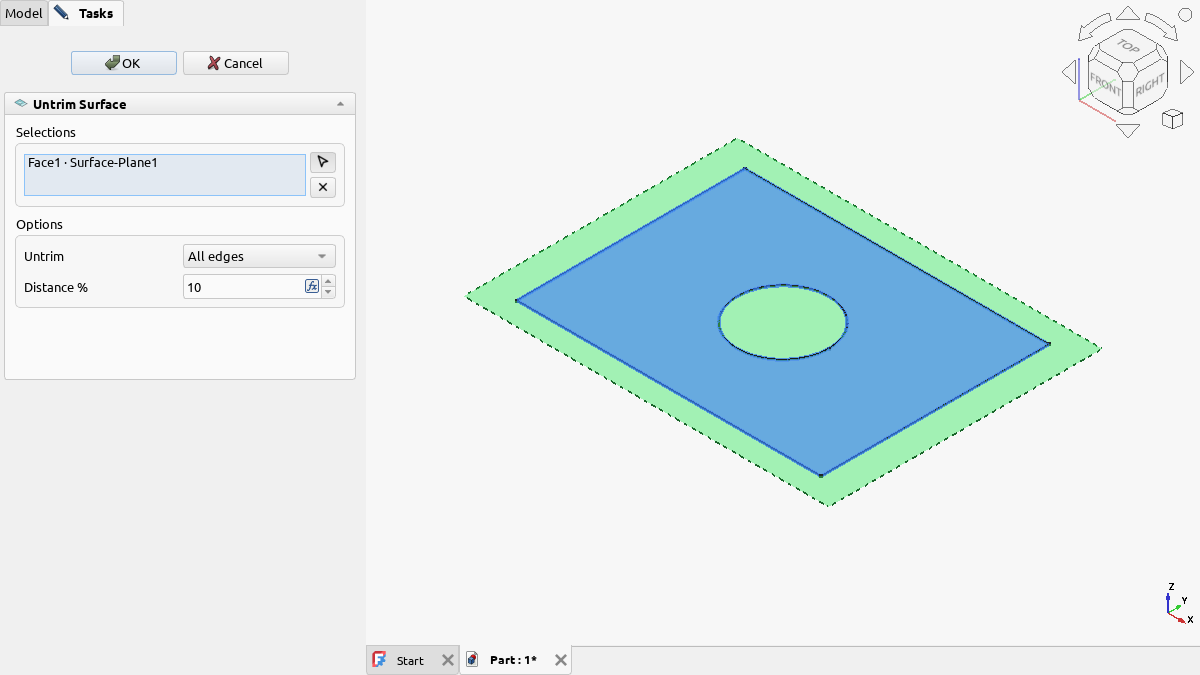
How to use it
- Select the face and click Untrim Surface.
- Choose what to Untrim: Internal edges fills the face's holes, External edges grows it past its outline and keeps the holes, All edges does both. Distance % says how far it grows.
- Click OK.
Where to find it
- The Surfaces toolbar, in the More Surfaces drop-down.
- Solid Design → Surfaces → Untrim Surface
- Insert → Surface → Untrim Surface
- Command search: press / in the 3D view and type its name.
- The command line: : then
untrimsurface(below).
The panel
Every control's tooltip says the same as here: hover over it in FreeCAD. OK (or Enter) makes the feature, Cancel (or Esc) leaves the model as it was.
Selections
| Control | Kind | What it does |
|---|---|---|
| Faces | Selection list: click faces | The faces to untrim |
Options
| Control | Kind | What it does |
|---|---|---|
| Untrim | One of: All edges, Internal edges, External edges | Internal edges: fill the face's holes. All edges: the whole surface it lies on, grown by the percentage. External edges: grown, holes kept. |
| Distance % | A count | How much bigger than the face, in each direction |
On the command line
Press : in the 3D view and type untrimsurface, then what to set. See the command line for how it works.
Options it takes
| Option | How to type it | What it is |
|---|---|---|
UntrimType |
a word: alledges, internaledges, externaledges |
Internal edges: fill the holes. All edges: the whole surface, grown. External edges: grown, holes kept |
DistancePercent |
distancepercent=a value |
How much bigger (All / External) |
Properties
All properties
What the feature stores, as the Property editor shows it (select the feature in the tree, then the Data tab). The panel sets these for you.
| Property | Kind | Default | What it is |
|---|---|---|---|
Items |
Picks | – | Faces to untrim |
UntrimType |
Choice | All edges | Internal edges: fill the holes. All edges: the whole surface, grown. External edges: grown, holes kept Choices: All edges, Internal edges, External edges. |
DistancePercent |
Percent | 10 | How much bigger (All / External) |