Dome
 Adds a dome (or a dent) on flat faces.
Dome raises a dome (or presses a dent) on a flat face, its edge following the face's outline.
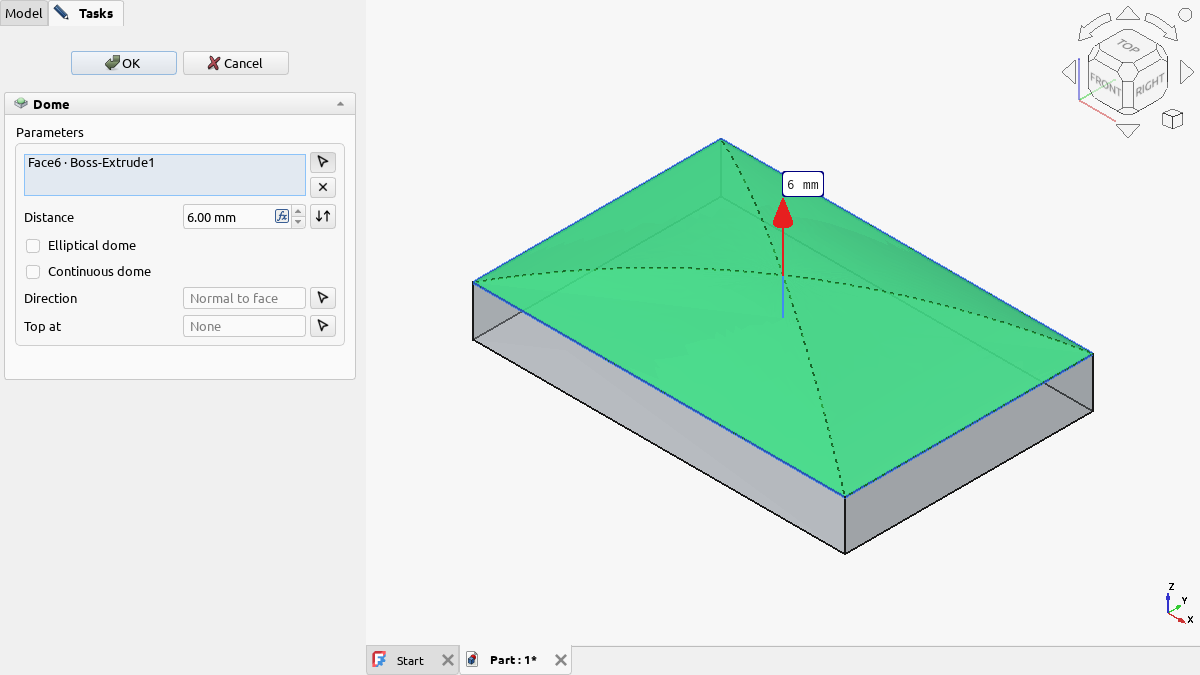
How to use it
- Select one or more flat faces.
- Click Dome.
- Set the Distance it rises (or drag the arrow). Reverse it for a dent.
- Click OK.
Good to know
- Elliptical dome gives an elliptical section; Continuous dome keeps it smooth over a non-round outline.
Where to find it
- The Features toolbar.
- Solid Design → Features → Dome
- Insert → Features → Dome
- Command search: press / in the 3D view and type its name.
- The command line: : then
dome(below).
The panel
Every control's tooltip says the same as here: hover over it in FreeCAD. OK (or Enter) makes the feature, Cancel (or Esc) leaves the model as it was.
Parameters
| Control | Kind | What it does |
|---|---|---|
| Faces | Selection list: click faces | The flat faces to dome |
| Distance | A length | The dome's height (a flip button beside it) |
| Elliptical dome | A check box | Half an ellipsoid on a round face; square to the face at its edge on others |
| Continuous dome | A check box | Faces that aren't round: the outline rounds off as it rises, with no creases from the corners |
| Direction | Selection box: click an edge, axis or plane | Lean the dome this way; empty: straight up from the face |
| Top at | Selection box: click a point or vertex | The dome's top goes through this point (it sets the height and lean) |
Drag handles
While the panel is open, drag the handles in the 3D view to set Distance, or click a handle's value and type. The same handles show when you select the feature in the tree, so you can change it without opening the panel. See drag handles.
On the command line
Press : in the 3D view and type dome, then what to set. See the command line for how it works.
Values typed straight after the name set, in order: Distance. For example :dome 5.
Options it takes
| Option | How to type it | What it is |
|---|---|---|
Distance |
distance=a value |
The dome's height |
ReverseDirection |
reversedirection turns it on, reversedirection=no off |
A dent instead of a dome |
EllipticalDome |
ellipticaldome turns it on, ellipticaldome=no off |
Half an ellipsoid (round faces) or square to the face at its edge |
ContinuousDome |
continuousdome turns it on, continuousdome=no off |
Faces that aren't round: round the outline off as it rises (no creases) |
Properties
All properties
What the feature stores, as the Property editor shows it (select the feature in the tree, then the Data tab). The panel sets these for you.
| Property | Kind | Default | What it is |
|---|---|---|---|
Items |
Picks | – | Flat faces to dome |
Distance |
Length | 5 mm | The dome's height |
ReverseDirection |
Yes/No | No | A dent instead of a dome |
EllipticalDome |
Yes/No | No | Half an ellipsoid (round faces) or square to the face at its edge |
ContinuousDome |
Yes/No | No | Faces that aren't round: round the outline off as it rises (no creases) |
DomeDirection |
Picks | – | Lean the dome along this direction (edge, axis or plane); empty: square to the face |
ConstraintPoint |
Picks | – | The dome's top goes through this point (sets the height and the lean) |