Mounting Boss
 Adds a round boss on a face, with a hole or a pin and optional fins: click where it goes.
Mounting Boss adds a screw boss in one go: the boss, its hole or pin, draft, and fins to brace it. Made for plastic parts.
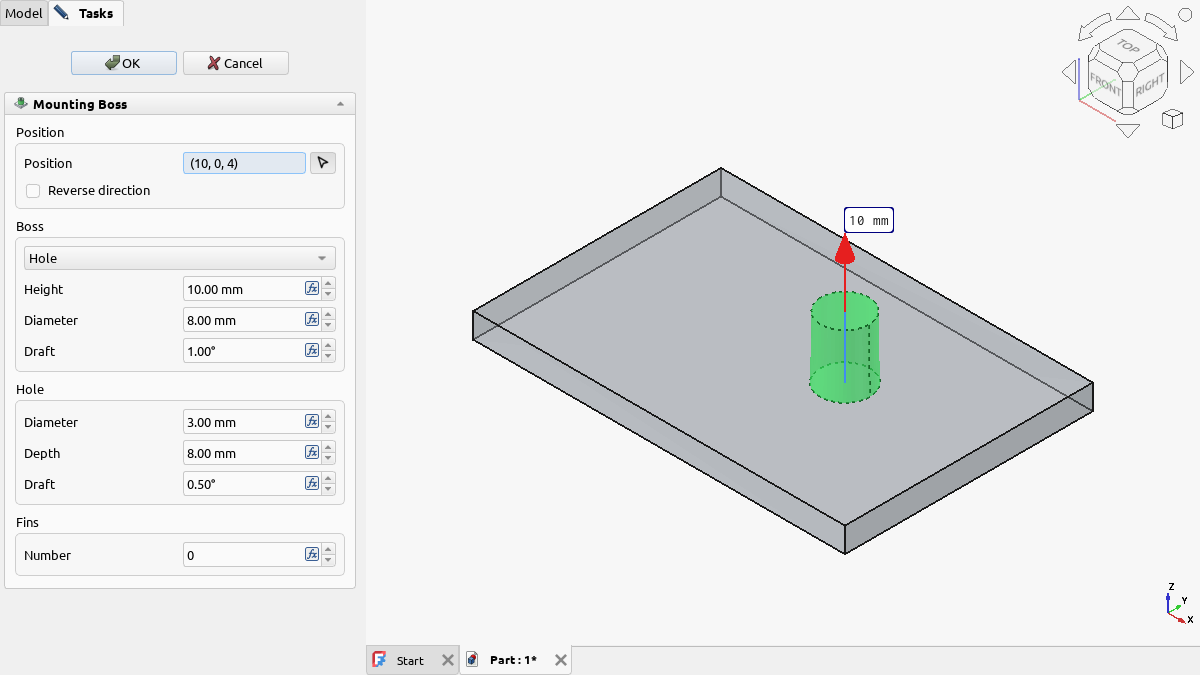
How to use it
- Click Mounting Boss.
- Click on the face where it stands.
- Choose Hole (for a screw) or Pin (to locate a part), and set the boss's Height, Diameter and Draft.
- Set the hole or pin, and the number of Fins (0 for none).
- Click OK.
Where to find it
- The Features toolbar, in the Fastening Features drop-down.
- Solid Design → Features → Mounting Boss
- Command search: press / in the 3D view and type its name.
- The command line: : then
mountingboss(below).
The panel
Every control's tooltip says the same as here: hover over it in FreeCAD. OK (or Enter) makes the feature, Cancel (or Esc) leaves the model as it was.
Position
| Control | Kind | What it does |
|---|---|---|
| Position | Selection box: click on a face | Where the boss stands: click on a face |
| Reverse direction | A check box | Stand the other way off the face |
Boss
| Control | Kind | What it does |
|---|---|---|
| One of: Hole, Pin | Hole: a hole down the boss for a screw or an insert. Pin: a pin on top. | |
| Height | A length | Boss height, from the face |
| Diameter | A length | Boss diameter at the face |
| Draft | An angle | Draft on the boss's outside |
Hole
| Control | Kind | What it does |
|---|---|---|
| Diameter | A length | Hole diameter at the top |
| Depth | A length | Hole depth, from the top |
| Draft | An angle | Draft in the hole |
Pin
Shown only for some choices above.
| Control | Kind | What it does |
|---|---|---|
| Diameter | A length | Pin diameter |
| Height | A length | Pin height, above the boss |
Fins
Fins tie the boss to the wall round it
| Control | Kind | What it does |
|---|---|---|
| Number | A count | Number of fins (0: none) |
| Length | A length | How far the fins reach out (shown for some choices only) |
| Height | A length | Fin height, from the face (shown for some choices only) |
| Thickness | A length | Fin thickness (shown for some choices only) |
| Angle | An angle | Turns the fins round the boss (shown for some choices only) |
Drag handles
While the panel is open, drag the handles in the 3D view to set Height, or click a handle's value and type. The same handles show when you select the feature in the tree, so you can change it without opening the panel. See drag handles.
On the command line
Press : in the 3D view and type mountingboss, then what to set. See the command line for how it works.
Values typed straight after the name set, in order: Height. For example :mountingboss 10.
Options it takes
| Option | How to type it | What it is |
|---|---|---|
ReverseDirection |
reversedirection turns it on, reversedirection=no off |
Stand the other way off the face |
BossType |
a word: hole, pin |
Hole: a hole down the boss (for a screw or insert). Pin: a pin on top |
Height |
height=a value |
Boss height, from the face |
Diameter |
diameter=a value |
Boss diameter at the face |
Draft |
draft=a value |
Draft on the boss's outside |
HoleDiameter |
holediameter=a value |
Hole diameter at the top |
HoleDepth |
holedepth=a value |
Hole depth, from the top |
HoleDraft |
holedraft=a value |
Draft in the hole |
PinDiameter |
pindiameter=a value |
Pin diameter |
PinHeight |
pinheight=a value |
Pin height, above the boss |
Fins |
fins=a whole number |
Number of fins (0: none) |
FinLength |
finlength=a value |
How far the fins reach out from the boss |
FinHeight |
finheight=a value |
Fin height, from the face |
FinThickness |
finthickness=a value |
Fin thickness |
FinAngle |
finangle=a value |
Turns the fins round the boss |
Properties
All properties
What the feature stores, as the Property editor shows it (select the feature in the tree, then the Data tab). The panel sets these for you.
| Property | Kind | Default | What it is |
|---|---|---|---|
Items |
Picks | – | The face it stands on |
Position |
Text | Where on the face (x,y,z) | |
ReverseDirection |
Yes/No | No | Stand the other way off the face |
BossType |
Choice | Hole | Hole: a hole down the boss (for a screw or insert). Pin: a pin on top Choices: Hole, Pin. |
Height |
Length | 10 mm | Boss height, from the face |
Diameter |
Length | 8 mm | Boss diameter at the face |
Draft |
Angle | 1° | Draft on the boss's outside |
HoleDiameter |
Length | 3 mm | Hole diameter at the top |
HoleDepth |
Length | 8 mm | Hole depth, from the top |
HoleDraft |
Angle | 0.5° | Draft in the hole |
PinDiameter |
Length | 3 mm | Pin diameter |
PinHeight |
Length | 4 mm | Pin height, above the boss |
Fins |
Whole number | 0 | Number of fins (0: none) |
FinLength |
Length | 4 mm | How far the fins reach out from the boss |
FinHeight |
Length | 6 mm | Fin height, from the face |
FinThickness |
Length | 1 mm | Fin thickness |
FinAngle |
Angle | 0° | Turns the fins round the boss |