Vent
 Cuts a vent from a sketch: its outer loop opens the wall, its lines stay as ribs and its inner loops as spars.
Vent cuts a vent from one sketch: its outer loop opens the wall, its lines stay as ribs and its inner loops as spars.
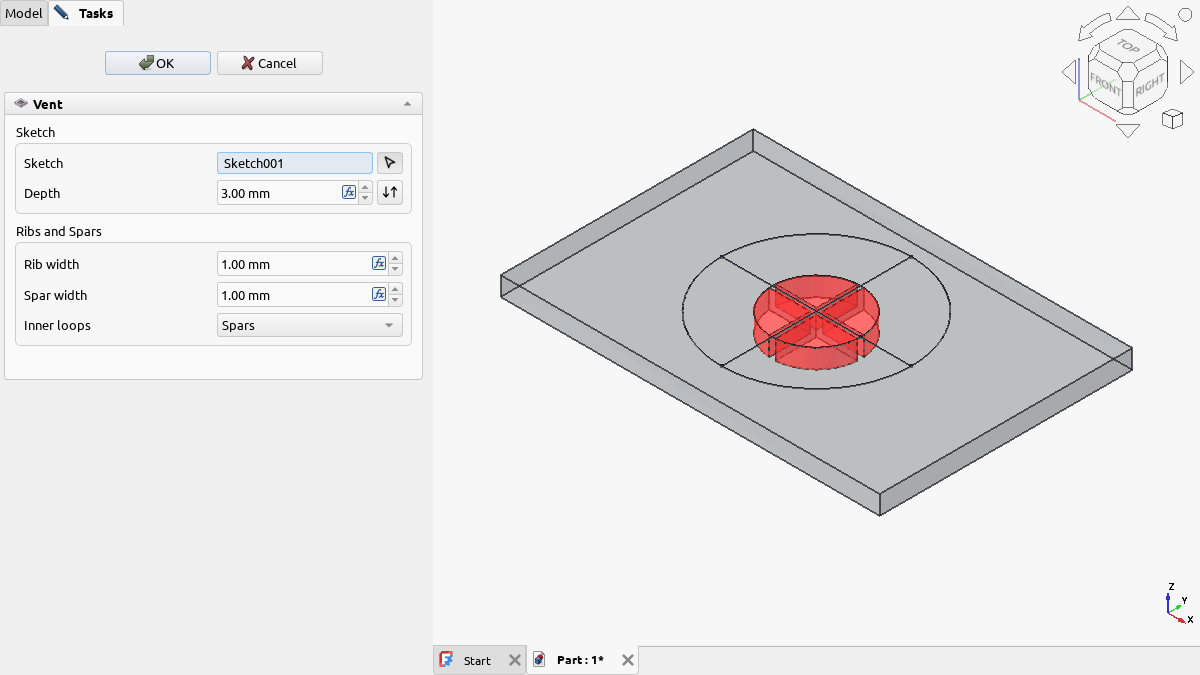
How to use it
- Sketch the vent on (or above) a face: an outer loop, lines across it for ribs, and inner loops for spars.
- Select the sketch and click Vent.
- Set the Depth of the cut, the Rib width and Spar width, and whether inner loops make Spars or are filled in (Fill-in).
- Click OK.
Where to find it
- The Features toolbar, in the Fastening Features drop-down.
- Solid Design → Features → Vent
- Command search: press / in the 3D view and type its name.
- The command line: : then
vent(below).
The panel
Every control's tooltip says the same as here: hover over it in FreeCAD. OK (or Enter) makes the feature, Cancel (or Esc) leaves the model as it was.
Sketch
The outer loop is the vent; lines are ribs, inner loops spars
| Control | Kind | What it does |
|---|---|---|
| Sketch | Selection box: click a sketch | The vent's sketch |
| Depth | A length | How deep it cuts (the wall's thickness) (a flip button beside it) |
Ribs and Spars
| Control | Kind | What it does |
|---|---|---|
| Rib width | A length | Width of the ribs (the sketch's lines) |
| Spar width | A length | Width of the spars (inner loops) |
| Inner loops | One of: Spars, Fill-in | Spars: a ring of material along each inner loop. Fill-in: the loop is kept solid |
On the command line
Press : in the 3D view and type vent, then what to set. See the command line for how it works.
Options it takes
| Option | How to type it | What it is |
|---|---|---|
Depth |
depth=a value |
How deep it cuts (the wall's thickness) |
ReverseDirection |
reversedirection turns it on, reversedirection=no off |
Cut the other way from the sketch |
RibWidth |
ribwidth=a value |
Rib width |
SparWidth |
sparwidth=a value |
Spar width |
InnerLoops |
a word: spars, fillin |
Inner loops: Spars (a ring of material along them) or Fill-in (kept solid) |
Properties
All properties
What the feature stores, as the Property editor shows it (select the feature in the tree, then the Data tab). The panel sets these for you.
| Property | Kind | Default | What it is |
|---|---|---|---|
Sketch |
Object | – | The vent's sketch: a closed boundary, lines for ribs, inner loops for spars |
Depth |
Length | 3 mm | How deep it cuts (the wall's thickness) |
ReverseDirection |
Yes/No | No | Cut the other way from the sketch |
RibWidth |
Length | 1 mm | Rib width |
SparWidth |
Length | 1 mm | Spar width |
InnerLoops |
Choice | Spars | Inner loops: Spars (a ring of material along them) or Fill-in (kept solid) Choices: Spars, Fill-in. |