Fillet
 Creates a rounded internal or external face along one or more edges.
Fillet rounds edges. Pick edges, or a face to round all its edges.
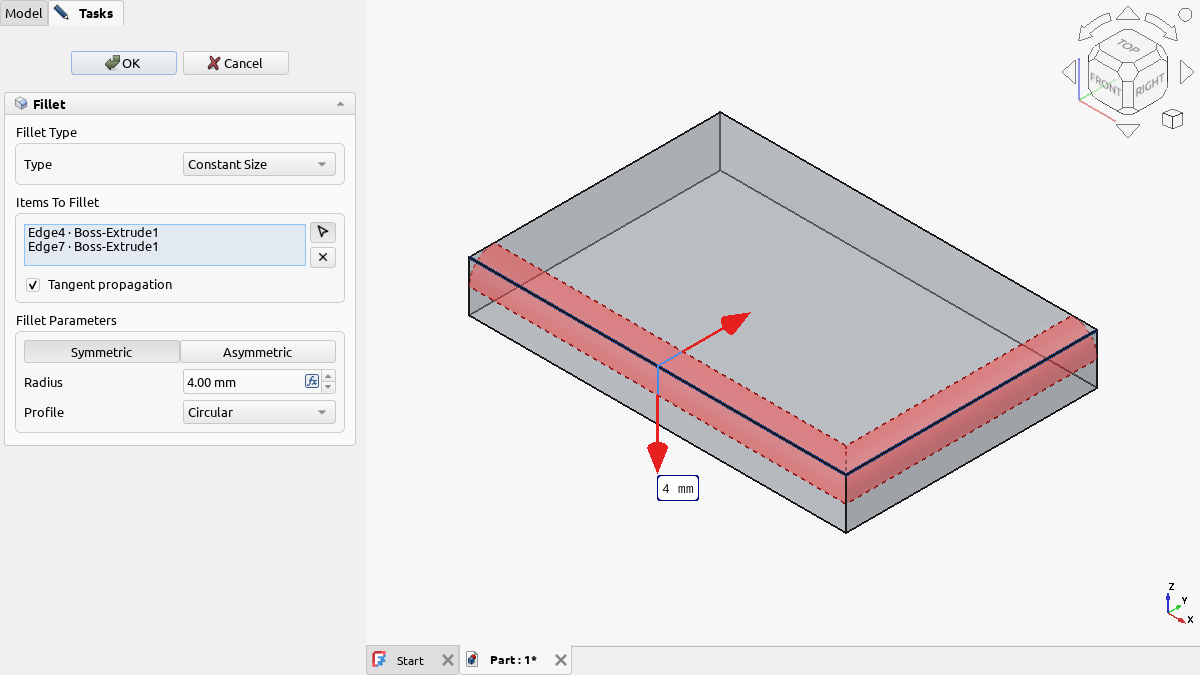
How to use it
- Select the edges (or faces) to round.
- Click Fillet. The preview shows the rounds.
- Set the Radius, or drag the handle on an edge in the 3D view.
- Click OK.
Good to know
- Tangent propagation carries the fillet along edges that run smoothly on from the ones you picked.
- Type gives SolidWorks' other fillets: Variable Size (a radius at each end and points between), Face Fillet (between two sets of faces) and Full Round Fillet (a full round across a wall, from three sets of faces).
- Asymmetric uses a different distance on each face; Profile changes the round's shape (conic or curvature continuous).
- With an edge picked, the chain button by the list adds tangent, loop and chain edges at a click. See picking things.
Where to find it
- The Features toolbar.
- Solid Design → Features → Fillet
- Insert → Features → Fillet
- Command search: press / in the 3D view and type its name.
- The command line: : then
fillet(below).
The panel
Every control's tooltip says the same as here: hover over it in FreeCAD. OK (or Enter) makes the feature, Cancel (or Esc) leaves the model as it was.
Fillet Type
| Control | Kind | What it does |
|---|---|---|
| Type | One of: Constant Size, Variable Size, Face Fillet, Full Round Fillet | Constant Size: one radius. Variable Size: the radius changes from start to end along the edges. Face Fillet: rounds where two sets of faces meet. Full Round Fillet: replaces a centre face with a round between two side faces. |
Items To Fillet
| Control | Kind | What it does |
|---|---|---|
| Items | Selection list: click edges or faces in the 3D view | The edges to round. A face rounds all its edges. Click an item again to take it out. |
| Tangent propagation | A check box | Also include the edges tangent to the ones you picked |
Items To Fillet
Shown only for some choices above.
| Control | Kind | What it does |
|---|---|---|
| Faces | Selection list: click faces | The first set of faces (a side face for a full round). Click it again to take it out. |
| Faces | Selection list: click faces | The face the full round replaces. Click it again to take it out. (shown for some choices only) |
| Faces | Selection list: click faces | The second set of faces (the other side face for a full round). Click it again to take it out. |
| Edges | Selection list: click edges | Optional: edges on a face set where the round stops (its size follows them). Click it again to take it out. (shown for some choices only) |
Face set 1
Face set 2
Fillet Parameters
| Control | Kind | What it does |
|---|---|---|
| **Symmetric \ | Asymmetric** | Buttons: Symmetric \ |
| Radius | A length | Radius of the rounds |
| Distance 2 | A length | Asymmetric: the distance on the second face (a flip button beside it; shown for some choices only) |
| Profile | One of: Circular, Conic Rho, Curvature Continuous | Circular: a round. Conic Rho: a conic, its shoulder set by rho. Curvature Continuous: a softer round that meets the faces without a jump in curvature. |
| Rho | A number | Conic Rho: 0.05 (flat) to 0.95 (sharp); 0.5 is a parabola (shown for some choices only) |
| Start radius | A length | Radius at the start of the edges (a flip button beside it; shown for some choices only) |
| End radius | A length | Radius at the end of the edges (shown for some choices only) |
| A list | Radii along the edges: click one to change it (shown for some choices only) | |
| Add | A button | (a Delete button; shown for some choices only) |
| Position | A number | How far along the edges, in percent (shown for some choices only) |
| Radius | A number | The radius there (shown for some choices only) |
Drag handles
While the panel is open, drag the handles in the 3D view to set Radius, or click a handle's value and type. The same handles show when you select the feature in the tree, so you can change it without opening the panel. See drag handles.
On the command line
Press : in the 3D view and type fillet, then what to set. See the command line for how it works.
Values typed straight after the name set, in order: Radius. For example :fillet 1.
Options it takes
| Option | How to type it | What it is |
|---|---|---|
TangentPropagation |
tangentpropagation turns it on, tangentpropagation=no off |
Include edges tangent to the picked ones |
FilletType |
a word: constantsize, variablesize, facefillet, fullroundfillet |
Fillet type |
Radius |
radius=a value |
Radius |
StartRadius |
startradius=a value |
Variable Size: radius at the start |
EndRadius |
endradius=a value |
Variable Size: radius at the end |
ReverseVariable |
reversevariable turns it on, reversevariable=no off |
Variable Size: swap which end gets the start radius |
FilletMethod |
a word: symmetric, asymmetric |
Symmetric: one radius. Asymmetric: a distance on each face |
Distance2 |
distance2=a value |
Asymmetric: the distance on the second face |
FlipAsymmetric |
flipasymmetric turns it on, flipasymmetric=no off |
Asymmetric: swap which face gets which distance |
Profile |
a word: circular, conicrho, curvaturecontinuous |
The round's shape across the edge |
ConicRho |
conicrho=a value |
Conic Rho: where the shoulder sits, 0.05 (flat) to 0.95 (sharp); 0.5 is a parabola |
Properties
All properties
What the feature stores, as the Property editor shows it (select the feature in the tree, then the Data tab). The panel sets these for you.
| Property | Kind | Default | What it is |
|---|---|---|---|
Items |
Picks | – | Edges, faces (all their edges) or vertices |
TangentPropagation |
Yes/No | Yes | Include edges tangent to the picked ones |
FilletType |
Choice | Constant Size | Fillet type Choices: Constant Size, Variable Size, Face Fillet, Full Round Fillet. |
Radius |
Length | 1 mm | Radius |
StartRadius |
Length | 1 mm | Variable Size: radius at the start |
EndRadius |
Length | 3 mm | Variable Size: radius at the end |
ReverseVariable |
Yes/No | No | Variable Size: swap which end gets the start radius |
FaceSet1 |
Picks | – | Face Fillet: face set 1. Full Round: side face set 1 |
FaceSet2 |
Picks | – | Face Fillet: face set 2. Full Round: side face set 2 |
CenterFaces |
Picks | – | Full Round: the centre face set |
FilletMethod |
Choice | Symmetric | Symmetric: one radius. Asymmetric: a distance on each face Choices: Symmetric, Asymmetric. |
Distance2 |
Length | 2 mm | Asymmetric: the distance on the second face |
FlipAsymmetric |
Yes/No | No | Asymmetric: swap which face gets which distance |
Profile |
Choice | Circular | The round's shape across the edge Choices: Circular, Conic Rho, Curvature Continuous. |
ConicRho |
Number | – | Conic Rho: where the shoulder sits, 0.05 (flat) to 0.95 (sharp); 0.5 is a parabola |
VariablePoints |
List | – | Variable Size: radii along the edges, as percent|radius |
HoldLine |
Picks | – | Face Fillet: the edges the round stops at (the hold line) |