What's Wrong
 Lists what's wrong in the model, why, and what to do: shows each problem in the view and offers the fix.
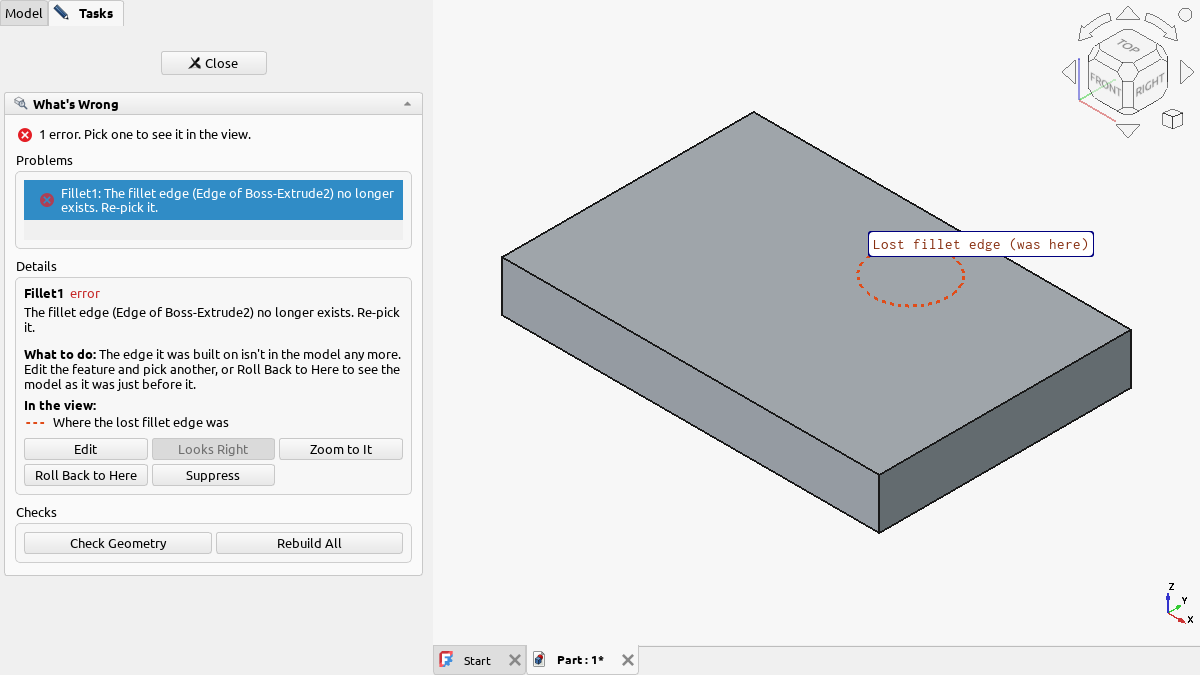
What's Wrong lists every problem in the model, says why it happened and what to do, shows it in the 3D view, and offers the fix. The health badge in the status bar opens it too.
How to use it
- Click What's Wrong, or the badge in the status bar when it shows a count.
- Click a problem. Details says what happened, why, and what to do; the 3D view shows where (a lost edge, in red, where it was).
- Use the buttons: Edit opens the feature, Looks Right accepts a repaired pick, Zoom to It, Roll Back to Here, Suppress.
- Click Close.
Good to know
- Check Geometry looks for faults a rebuild doesn't report: invalid bodies, edges shorter than 0.01 mm and faces thinner than 0.005 mm.
- See when something breaks.
Where to find it
- The Evaluate toolbar.
- Solid Design → Evaluate → What's Wrong
- Tools → Evaluate → What's Wrong
- Command search: press / in the 3D view and type its name.