Indent
 Presses a tool body's shape into a target body, with a wall round it, or cuts it in.
Indent presses a tool body's shape into a target body, leaving a wall of set thickness round it, or cuts the shape out.
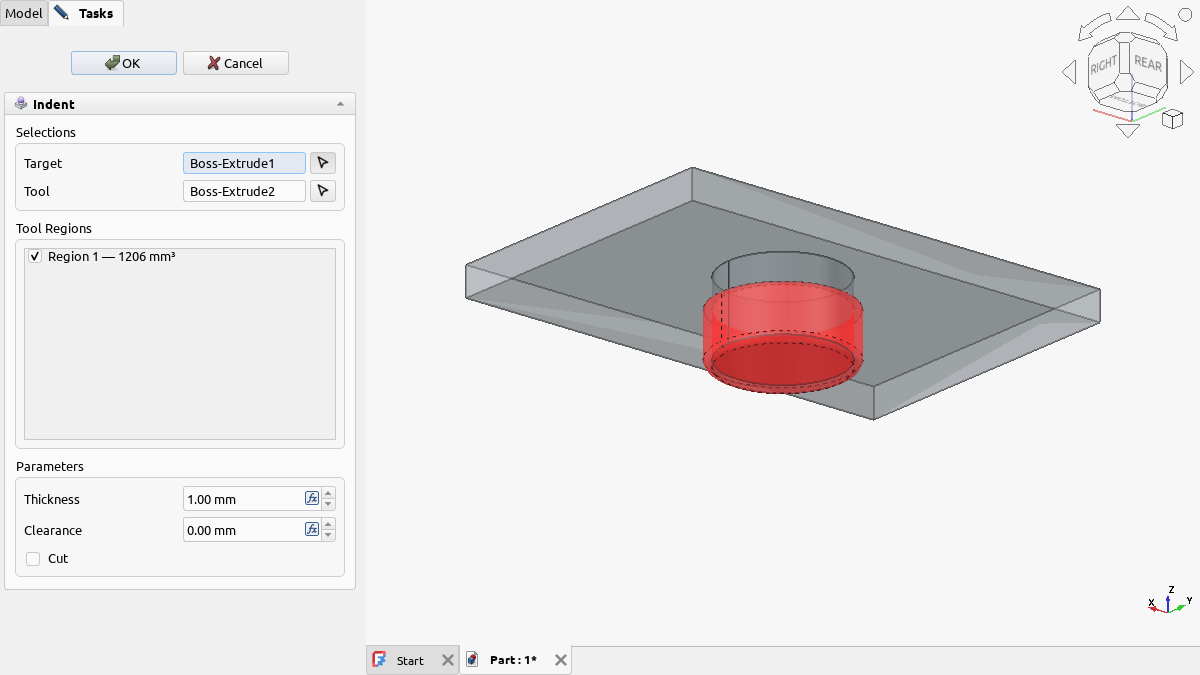
How to use it
- Place the tool body where it meets the target body.
- Select the target body, then the tool body, and click Indent.
- In Tool Regions, tick the parts of the tool that press in.
- Set the wall Thickness and Clearance, or tick Cut.
- Click OK.
Where to find it
- The Bodies toolbar, in the Deform Bodies drop-down.
- Solid Design → Bodies → Indent
- Insert → Features → Indent
- Command search: press / in the 3D view and type its name.
- The command line: : then
indent(below).
The panel
Every control's tooltip says the same as here: hover over it in FreeCAD. OK (or Enter) makes the feature, Cancel (or Esc) leaves the model as it was.
Selections
| Control | Kind | What it does |
|---|---|---|
| Target | Selection box: click a body | The body to indent |
| Tool | Selection box: click a body | The body whose shape is pressed in |
Tool Regions
The tool's parts outside the target: the target wraps the ticked ones
| Control | Kind | What it does |
|---|---|---|
| A list | The regions, numbered in the view: untick one and the target is only cut there |
Parameters
| Control | Kind | What it does |
|---|---|---|
| Thickness | A length | Wall thickness round the tool |
| Clearance | A length | Gap between the tool and the target |
| Cut | A check box | Only cut the target where the tool is (no wall) |
On the command line
Press : in the 3D view and type indent, then what to set. See the command line for how it works.
Options it takes
| Option | How to type it | What it is |
|---|---|---|
Thickness |
thickness=a value |
Wall thickness round the tool |
Clearance |
clearance=a value |
Gap between the tool and the wall |
Cut |
cut turns it on, cut=no off |
Only cut the target (no wall) |
Properties
All properties
What the feature stores, as the Property editor shows it (select the feature in the tree, then the Data tab). The panel sets these for you.
| Property | Kind | Default | What it is |
|---|---|---|---|
TargetBody |
Text | The body to indent, by ID | |
ToolBody |
Text | The body pressed in, by ID | |
ExcludedPoints |
List | – | A point inside each tool region not kept (x,y,z) |
Thickness |
Length | 1 mm | Wall thickness round the tool |
Clearance |
Length | 0 mm | Gap between the tool and the wall |
Cut |
Yes/No | No | Only cut the target (no wall) |