Command Line
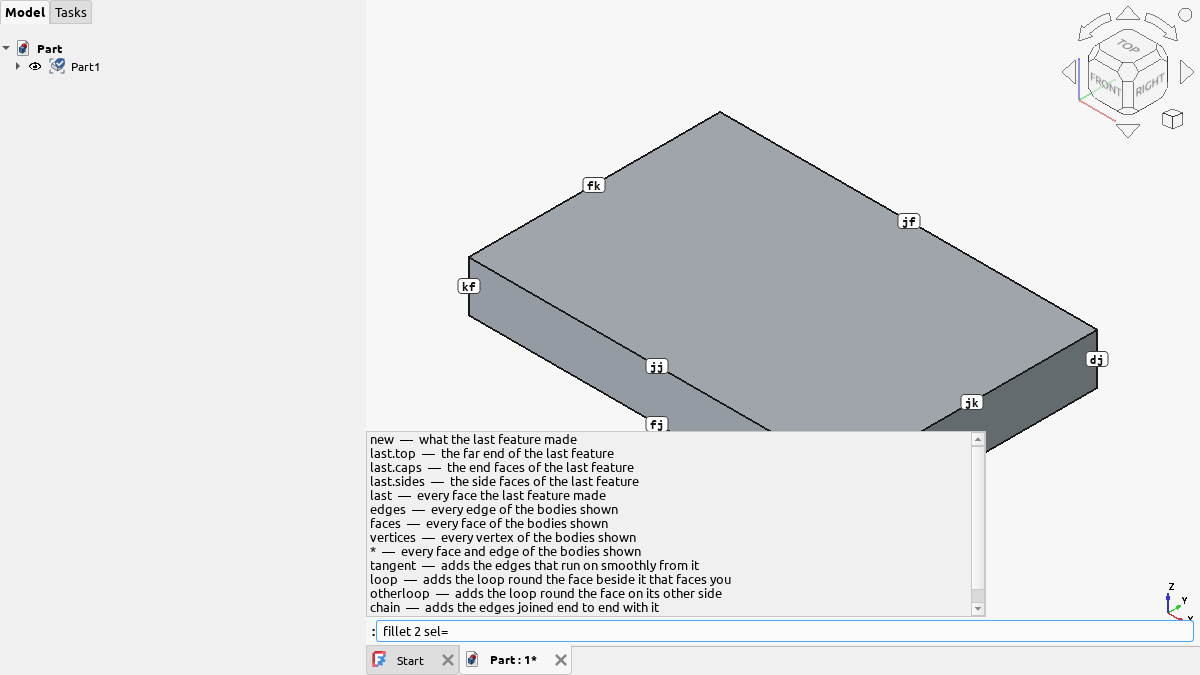
 Type a tool and its values, e.g. "fillet 2" (press : in the 3D view). Works on the selection, or what's under the pointer.
The command line runs a tool from the keyboard: type the tool and its values, and the feature is made with no panel. It's the fastest way to repeat simple features.
How to use it
- Select what the feature works on, or point at it.
- Press : in the 3D view. A bar opens at the bottom of the view.
- Type the tool and its values, for example
fillet 2orextrude 10 cut, and press Enter.
If the feature builds, it is made in one undo step. If it can't, its panel opens with your values in and the problem shown.
Good to know
sel=then Tab labels what you can pick in the view; type a label to pick it.- Tab completes, Up and Down go through the history.
- Keyboard modelling explains it all; the command line words lists every tool.
Where to find it
- Solid Design → Command Line
- Command search: press / in the 3D view and type its name.