Cosmetic Thread
 Shows a thread on a shaft or in a hole without modelling it: pick the circular edge where it starts.
Cosmetic Thread marks a thread without modelling it: dashed lines at the thread's diameter, and its callout. It keeps the model light.
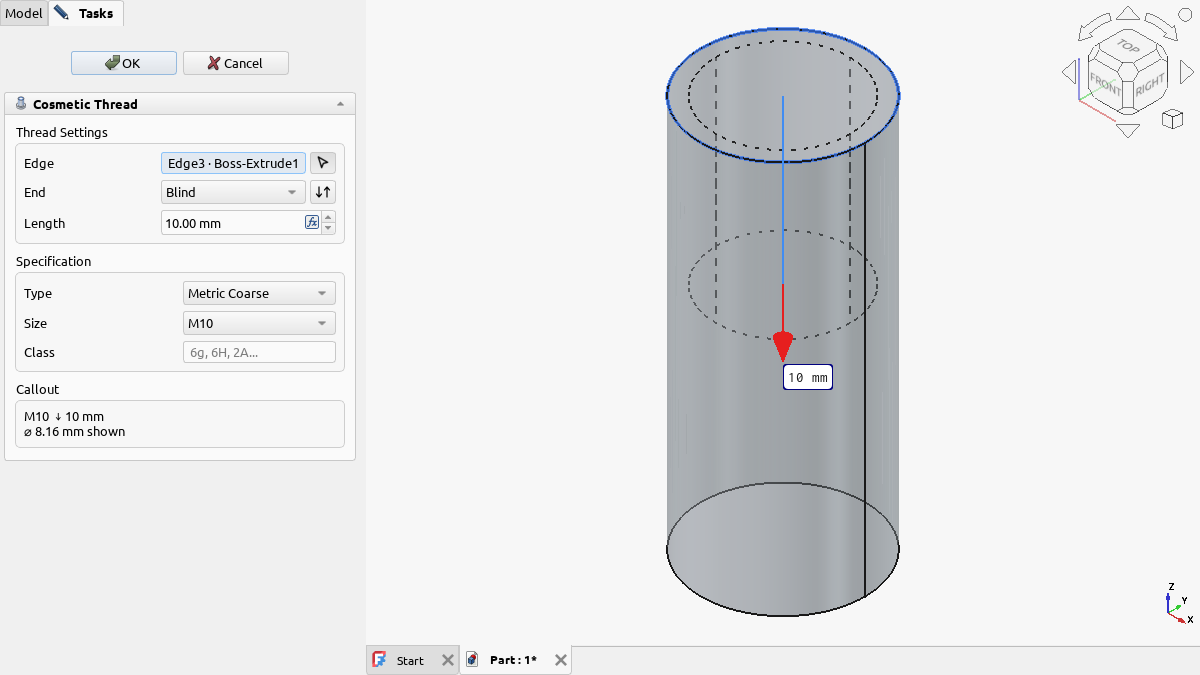
How to use it
- Select the circular edge where the thread starts.
- Click Cosmetic Thread.
- Choose the thread Type and Size, and how far it goes (End, Length).
- Click OK.
Where to find it
- The Features toolbar, in the Threads drop-down.
- Solid Design → Features → Cosmetic Thread
- Command search: press / in the 3D view and type its name.
- The command line: : then
cosmeticthread(below).
The panel
Every control's tooltip says the same as here: hover over it in FreeCAD. OK (or Enter) makes the feature, Cancel (or Esc) leaves the model as it was.
Thread Settings
| Control | Kind | What it does |
|---|---|---|
| Edge | Selection box: click a circular edge | The circular edge where the thread starts: a shaft's end or a hole's rim |
| End | One of: Blind, Up To Next | Blind: a length. Up To Next: to the end of the cylinder (a flip button beside it) |
| Length | A length | Thread length |
Specification
| Control | Kind | What it does |
|---|---|---|
| Type | One of: Metric Coarse, Metric Fine, Unified Coarse (UNC), Unified Fine (UNF) | The thread standard and series |
| Size | One of: M1.6, M2, M2.5, M3, M4, M5, M6, M8, M10, M12, M14, M16, M18, M20, M22, M24, M27, M30, M33, M36 | The thread size; it starts at the one nearest the cylinder |
| Class | The tolerance class, for the callout |
Callout
M10 ↓ 10 mm ⌀ 8.16 mm shown
Drag handles
While the panel is open, drag the handles in the 3D view to set Length, or click a handle's value and type. The same handles show when you select the feature in the tree, so you can change it without opening the panel. See drag handles.
On the command line
Press : in the 3D view and type cosmeticthread, then what to set. See the command line for how it works.
Values typed straight after the name set, in order: Length. For example :cosmeticthread 10.
Options it takes
| Option | How to type it | What it is |
|---|---|---|
Type |
a word: blind, uptonext |
How it is defined |
Flip |
flip turns it on, flip=no off |
Flip |
Series |
a word: metriccoarse, metricfine, unifiedcoarseunc, unifiedfineunf |
Thread standard and series |
Length |
length=a value |
Thread length (Blind) |
Properties
All properties
What the feature stores, as the Property editor shows it (select the feature in the tree, then the Data tab). The panel sets these for you.
| Property | Kind | Default | What it is |
|---|---|---|---|
Type |
Choice | Blind | How it is defined Choices: Blind, Up To Next. |
Reference1 |
Picks | – | Reference 1 |
Flip |
Yes/No | No | Flip |
Series |
Choice | Metric Coarse | Thread standard and series Choices: Metric Coarse, Metric Fine, Unified Coarse (UNC), Unified Fine (UNF). |
Size |
Text | Thread size (empty: the nearest one) | |
Length |
Length | 10 mm | Thread length (Blind) |
ThreadClass |
Text | Tolerance class, for the callout | |
Diameter |
Length | 0 mm | The diameter shown: the minor diameter on a shaft, the major one in a hole |
Callout |
Text | The thread's callout |